To my knowledge, it's not possible to achieve anything like this layout on Windows 11, Linux or Mac. I did try it in various Linux distros a few times but frankly got sick of navigating the maze of window managers et cetera. I think something like XFCE came close to providing a Windows-like taskbar but it was still far, far behind what Windows NT can offer.
Took me about 2 minutes to replicate on KDE Plasma[0][1]. I have a lot more things in my taskbar that I don't want to remove for this test, so it looks a little more crammed up.
I obsess somewhat about my computer's UI, but not to this degree. I want to maximize usable screen space, so just want the status bars slim and out of the way. I want to see the cpu/memory/swap/network/disk usage, which is easy. Lucky me!
However, if status bars are what you obsess about, Linux would love to have you! Many status bars are available[0], most of them open source and wildly customizable. You can configure one of the existing ones, fork an existing one, or write your own.
The parent comment shows two rows of different types - the upper row consists of the taskbar, and the lower row has the quick launch icons, drive links, and a music bar.
It's not. You can add quick launch icons and drive shortcuts natively (right click > Toolbars > New Toolbar). I only use Taskbar Tweaker to replace the Windows Aero-style tooltip with the standard jump list right click menu.
The media taskbar player can be added natively from older versions of iTunes, Windows Media Player, or others.
I haven’t used KDE in more than a decade, but I remember it being irrationally funny to me that I could rotate the desktop icons to any weird angle.
I have no idea why anyone would do that, but it was really fun to make my desktop look like it was arranged by someone who hadn’t developed motor skills yet.
Windows user and developer for nearly 30 years and migrated my thinkpad from windows 11 to Kubuntu a few days ago with almost zero friction and got my desktop exactly as I had it on windows, did a lazy write up here => https://rodyne.com/?p=3486 - I wont be going back even if Microsoft does release "Lindoze"
You can also configure it to keep open window buttons separate from the launcher icons, but with the lack of double stacking I rather have it "take over" the launcher.
The way I've set it up it will also only show the open windows for the virtual desktop or screen the bar being shown at, which helps alleviate the crowding issue of only having one row.
> I'll also create a feature request for resizing/stacking of rows.
That's the spirit! Please do file feature requests with the docks that you think might be close to what you want. A lot of foss projects are pretty receptive to feature requests.
Keep in mind that in the foss world you're not a customer - the people doing the work will be donating their free time to build a feature you're asking for, so please be nice and polite to them - the worst thing you can do on a feature request is have an entitled tone, or insinuate that their software is crap because it doesn't quite do what you want :)
Someone else suggested that adding 2 xfce panels might accomplish something pretty close to what you're after. I had a bit of a play around and agree with that. I didn't replicate your request exactly (because my panel is very different and I didn't want to break my setup too much) but depending on where your priorities lie I think you could probably get something pretty close.
Options that are similar:
a) If you really want the 'start menu' button to span both rows, use a single panel and set "row size" to e.g 48px and "number of rows" to 2. The con of this method is that the task list (list of programs) will span both rows, which is not what you have.
b) If you want to replicate your preferred setup more closely, you might not be able to have the 'start menu' button span both rows. To accomplish this I would add 2 panels of e.g 24px and put them both at the bottom of the screen. In one you'll have the task list and in another you'll have icons.
The media player controls might be an issue in xfce. I'm not sure if anything like that exists. However you definitely can have a systray icon for your media player which pops up media controls when you click on it.
There are other docks with more customisable widgets that will give you media controls like those, but I can't really make a solid recommendation for you unfortunately. The one I used to use was called cairo-dock, but I think that might be dead. Before that I used one called avant-window-navigator. There's also a couple of others that I'm aware of, e.g tint2 and wbar.
I'd be a little bit surprised if there are zero docks out there that can do what you want. The thing is you might have to try screwing around with the config for 20 different ones if you insist on replicating that layout exactly :/
I'm pretty sure, you can do this stacking 2 panels in XFCE4. Maybe except the multi row start button but if you really need that, you could even create a 3rd panel.
It's not the only thing, although it is a big one. Honestly Windows just feels better to me and works the way I want it to. It might help that I've always used enterprise versions so I've never had to deal with the awful bloatware. The few things I do want to disable are pretty painless to remove through the group policy editor or one of many freeware GUI tweaker programs.
yeah, fair. There is a big learning curve for an entire desktop environment. And that's before you start getting into trying to do super-custom things and replicate exactly what you had on windows.
I've always held that switching to Linux is hardest for the most technical people, because you know how to do everything already - figuring out how to do X in Linux might take you literally hours, or you can just reboot into windows, where you know how to do it and it will take 5 minutes. It's hard to make that investment in learning the new stuff when you just want to get stuff done.
(But IMHO it's well worth it - For >15 years I've always been appalled every time I've used windows about how inflexible and unconfigurable it is. There's a thousand things that I've been doing forever that I'm just so used to, e.g the ability to make any window always on top, or to use my mouse wheel to roll them up so that only the titlebar shows. There's lots of things like that that I use every day without thinking about it, and the lack of those things makes windows extremely frustrating for me)


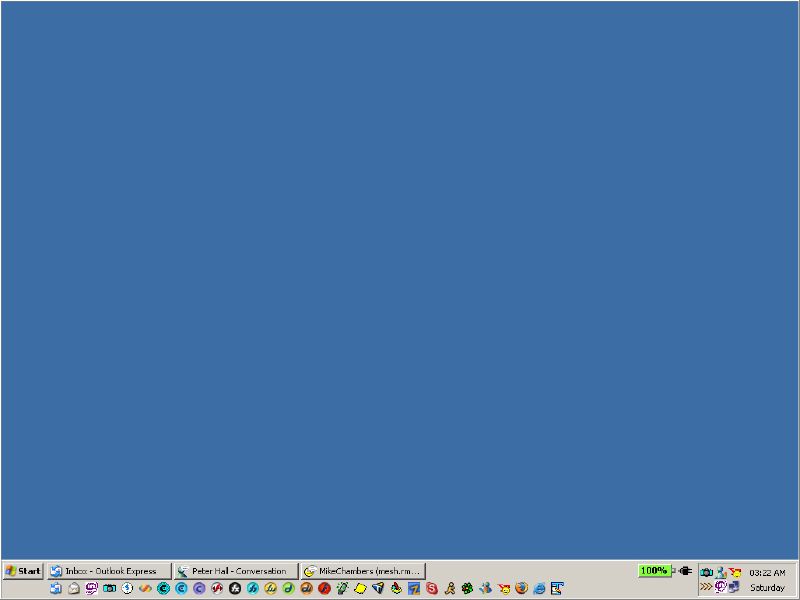
For example, this is my taskbar layout: https://i.ibb.co/1GqKH27L/taskbar-layout.png
To my knowledge, it's not possible to achieve anything like this layout on Windows 11, Linux or Mac. I did try it in various Linux distros a few times but frankly got sick of navigating the maze of window managers et cetera. I think something like XFCE came close to providing a Windows-like taskbar but it was still far, far behind what Windows NT can offer.