I would add one more general security tip. Always restrict your mapped ports to localhost (as in 127.0.0.1:3306:3306) unless you really want to expose it to the world.
I think it's counterintuitive, but I learned the hard way that 3306:3306 will automatically add a rule to open the firewall on linux and make MySQL publicly accessible.
Yep, this was especially deadly a few years back with Redis because it bound to 0.0.0.0 by default and by default Redis allows connections without a password.
So if you had 6379:6379 published anyone from the internet could connect to your Redis container. Oops.
> Always restrict your mapped ports to localhost (as in 127.0.0.1:3306:3306) unless you really want to expose it to the world
It's also worth pointing out that typically you don't even need to publish your database port. If you omit it, containers on the same network can still communicate with each other.
Very rarely do I end up publishing ports in production. If you wanted to connect to postgres you could still docker exec into the container on the box it's running on and interact with your db using psql that's already installed in that container.
This is why I like to use both a host-based firewall __as well as__ a network-based firewall. For the VPS's that I have running on the internet, I always use the hosting provider's firewall offering in addition to iptables (or ufw).
This is something AWS gets right, and Digital Ocean and Linode both get wrong (they offer no cloud firewall of any sort, to my knowledge).
It should be trivial for me to lock down the ports of my instance, from the VPS web UI. AWS lets me create a new instance which is entirely closed to incoming connections except for port 22, which is closed except for whitelisting my IP address. This gives me good assurances even if my instance is running a vulnerable SSH server. It's also trivial to block outgoing connections, where that's appropriate.
It also means my instance is spared from constant probing, which keeps the logs clear.
> automatically add a rule to open the firewall on linux
There's no way this is true. This completely defeats the purpose of a firewall.
If it is happening, then it's Docker doing this - not the linux firewall that comes stock with most distribution (iptables and the like). They would never simply add rules to the chains just because something was listening on that port.
Really, the best security advice for using Docker is to not use Docker. Unfortunately, there aren't very many "hold your hand" alternatives available. Aside from LXD and that family of technologies, which are criminally underused.
Docker uses iptables for port forwarding, and those rules typically end up ahead of the rules inserted by your firewall (firewalld/ufw/manual scripts/whatever).
It's not so much that they explicitly open a firewall rule, as that they take a networking path that isn't really covered by traditional firewalls.
Another way of viewing it is that Docker "is" your firewall for your container workloads, and that adding a port-forward is equivalent to adding a firewall rule. Of course, that doesn't change that public-by-default is a bad default.
This is (imho) a huge flaw in the concept of a "container". I don't think most people comprehend how much crap is going on in the background.
For most container purposes, host networking and the default process namespace is absolutely fine, and reduces a lot of problems with interacting with containerized apps. 95% of the use case of containers is effectively just a chroot wrapper. If you need more features, this should be optional. This would also make rootless federated containerized apps just work. But nobody wants to go back to incremental features if Docker gives them everything at once.
Kubernetes as well. We ran into instances where iptables contention was so bad during outage recovery that things just stalled. iptables-save looked like a bomb went off.
> My current policy is to set `"iptables": false` in Docker's `daemon.json` on any public machine. I don't understand why this isn't the default.
If you don't muck with iptables then you need a (slow) userspace proxy to expose your pods. That also means losing things like the source IP address for any incoming connections.
If this is a surprise to you, scan your servers and see what else has helpful behavior which you didn’t expect. Services like shodan.io will even do this regularly and email you when things change.
It’s easy to blame Docker but I’ve seen this failure mode happen many times over the years - even experienced admins make mistakes. As always, defense in depth and continuous monitoring trumps raging about software.
The default is terrible. It got into 1.0 and just got stuck there :(
Changing defaults on such widely used software is, unfortunately, hard.
For whatever reason Docker prepends rules.
There are things you can do to add your own filtering (Docker forwards to the "DOCKER-USER" chain where you can put your rules), but it requires people to know what is happening I order to use it securely.
It would be really nice to be in a more secure situation by default... open to suggestions and contributions for Docker 21.
Have you considered at least logging to the terminal on container start whenever a port gets exposed to the internet because of a 3306:3306 (i.e. without an explicit ip to bind to)? Part of the issue seems to be that people haven't read the docs and so don't really understand what that snippet they copied from that helpful blog, you know, does
I like this idea. I believe we already have a mechanism for warning on container create.
The nice thing is admins can already define a default value that the eninge will use to bind to (when no address is specified on -p).
Warning can point users to that setting.
Perhaps make it easily quieted in the settings, and some kind of backoff between warnings? I definitely agree that it could be too much, on busy development systems especially!
That's definitely a tricky situation to be in since you'll inevitably get someone complaining that an upgrade broke something they depend on.
I like Godel_unicode's suggestion of logging and that could probably done in a stronger manner if there was some point (post-install, maybe starting a container) where it checked the existing rules and used a more prominent warning when there are existing rules which would prevent a container which would be reachable now from being reachable in the future. Given how widely Docker is used, I'd assume that'd be the kind of thing you'd need to add as a warning for multiple releases before even doing something like having it switch to a more secure default on new install.
I like the general idea, but ultimately suffers the same problem in that people have to know about it.
There actually is a setting to set the default bind address already.
If you can't change the default because of backwards compatibility and inertia, you can at least provide a well-documented, recommended, easy way of fixing the default.
Is there official documentation that tells users to set the default bind address as a best practice?
I wasn't thinking so much of just changing one setting, but rather having a way to easily reconfigure an installation to set multiple settings to improve security.
In addition, elevating this to the status of a command and documenting it as a best practice helps spread awareness.
I don't disagree with any of your points, but they aren't relevant to anything I've said. I never said Docker is the only one doing this. It's also not a surprise Docker in particular is doing this - Docker has a long history of doing bad things.
It is relevant because you said “there's no way this is true” when it is in fact true, which means that your understanding of how the system works doesn't match the actual behaviour. I mentioned the importance of scanning to catch those situations quickly.
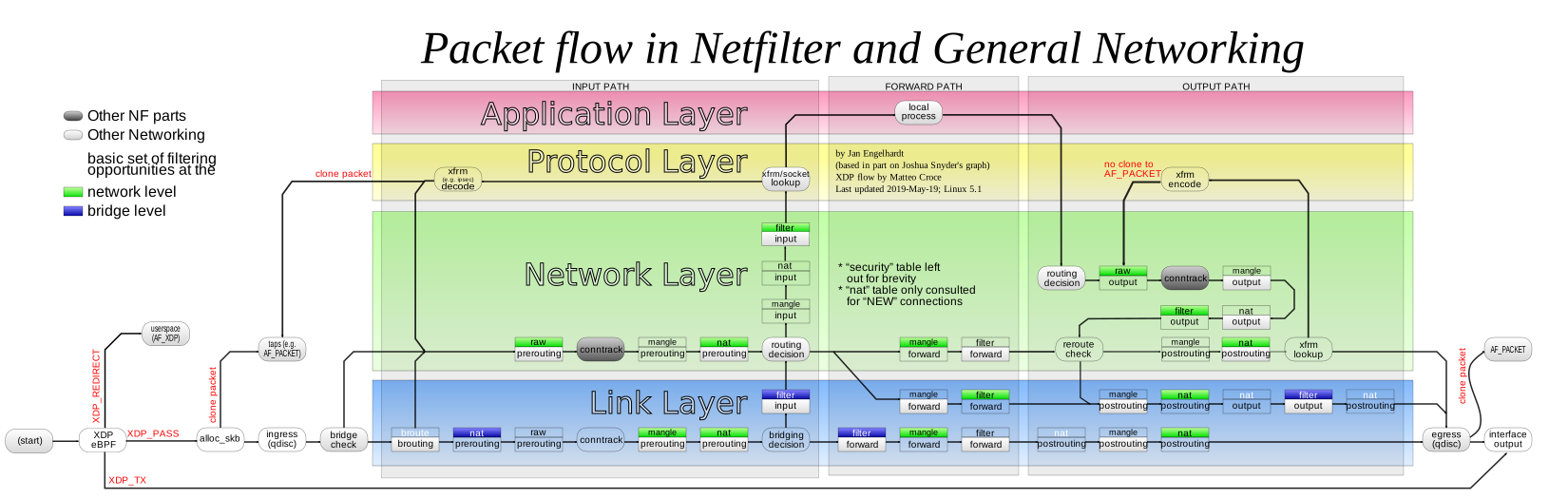
It has to do with the implementation of the networking. The DOCKER chain in the nat table gets hit by inbound traffic on the PREROUTING chain before UFW's chains on the filter table. IIRC, can get around this by directing UFW to write its rules to the DOCKER-USER chain.
Firewalld is implemented differently and will exhibit the expected blocking behavior: traffic targeting docker ports will encounter firewalld before it encounters docker.
>Aside from LXD and that family of technologies, which are criminally underused.
Criminally underused indeed. I have no idea why it's not more popular for 'average' users/orgs. I don't know what issues may come up with scaling this up, but in our small org we've been running 20-30 (mostly unprivileged) LXD containers in production for several years now for all sorts of intranet and external-facing services (auth, DB, web, etc). Sure, it requires a bit more thought to set up than Docker, but it's well-documented (for most people's uses at least), secure, stable and lightweight.
>I have no idea why it's not more popular for 'average' users/orgs.
Maybe because many devs use Macs / Windows? Maybe WSL may tilt the balance in LXDs favour, but on OSX? Run it a VM yourself without the conveniences of docker-compose up?
As a Linuxuser myself, i looked at the competing solutions (podman, LXD, and the one by Canonical whose name i forgot) and thought: "Ain't gonna fly in a mixed environment."
They may be technologically superior, worse is better once again i guess. Would prefer them to Docker too.
Yes it does, but it's very transparent - until you run into a few things that make it obvious, eg if you disk-image size limits, or memory limits.
I work with a few people who believed it was native, and used it for quite a while, until things started going wrong and we logged in to the vm to fix them.
Kinda my point. The reason docker is popular is simply that most of the devs are lazy, not very knowledgeable in the actual underlying technology and very short-sighted.
And docker marketing has very effectively used that to their advantage.
Yes it is, but docker for desktop runs it for you. You could use LXD etc by running Linux yourself in a virtualisation solution of your choice like VirtualBox or VMWare.
On Linux you are going to run docker in VM anyway if you care a bit about security, but I know that almost all devs run docker directly on their laptops and with the user's full access to docker - ie. their user effectively becomes user. Without second thought ...
People who know enough to consider architectures like this aren't the ones most likely to accidentally expose databases to the internet. It happens, but most often these mistakes are made by people who just don't have the experience to be wary.
I think software like docker have a responsibility to encourage secure-by-default configurations, but unfortunately "easy" is often the default that wins mindshare.
I agree with you, but since Docker is kind of a given, how can one learn the necessary stuff about networking as to not make these mistakes?
I always see best practices like this, but they don't really help in grokking what's happening and why. I'd like to know more about the networking stuff, but whenever i look something up it's very specific, so you don't really learn why it's bad.
How can a regular user understand how the network stack works? At least enough to get an instinct why something would be bad.
It's difficult for me to answer how other people should learn these things, since I personally just... tried to figure things out? It's been so long since I found basic networking mystifying that I'm not sure how to explain it to someone who doesn't have the same intuition. If you have something that's very specific, maybe make a guess on how it could be generalized and then test that guess. Try to build a mental model, and test that model.
I don't like using systems that are complete black boxes, so whenever I use something, I try gain a reasonable understanding of how it works under the hood. If a system claims to make X easy, I want to know at least what is involved in accomplishing that, even if the implementation details aren't relevant knowledge. I don't often need to dig into the nitty-gritty of how the Linux TCP stack works, but even having a broad idea of how the TCP protocol works is pretty useful, and especially how it relates to other networking protocols.
I guess for practical networking, it helps to first focus on IP addressing and routing; ie. how does a packet sent from your computer actually get through all the switches and routers to the destination computer? The short answer is that every node (including your computer) makes a routing decision on where to send the packet, and then it's sent forward. This happens at each "hop" until it appears at the end (or gets dropped by a firewall).
And from this simple logic and some fancy tools to help you make dynamic routing decisions in response to changes in network topology (router went down? update local route information and send the packet to the other router that's still up), you can build the internet in a fault-tolerant manner.
I guess you are cutting straight to the chase and overlooking the fundamentals. I took a lot from the Well-Architected framework from AWS and applied in all my projects.
Take a look at the security pillar with extra care. For the cloud I would suggest you take a basic practitioner exam, or at least a preparation course in a platform like whizlabs. There you would get a basic understanding of how networking is laid on the cloud.
For private, on-premises projects, it really comes down to what you have at hand. In this case maybe the Google SRE book would be good. You take good practices in maintaining a data center and apply the distilled knowledge to what makes sense to your infrastructure:
Read this book as in topics, not sequentially, coming back to the fundamentals when you feel lost, otherwise you might end up lost in technicalities that make little sense to your work.
Also take a look at the shared responsibility principle. There it is exposed what are the client and cloud provider responsibility. When you have a private on-premises project all you have to do is implement the entire responsibility stack that the cloud does for you.
I am not sure why you were downvoted. I agree with that. I prefer technologies that are restrictive by default and more flexible and potentially harmful configurations hidden behind explicit and well structured options.
Either an exception should be raised or a default safe behaviour should be adopted when the example is encountered. I prefere breaking as soon as possible because the alternative is harder to debug.
Exactly. A public facing ip for a server, especially a database, is just a bad idea. You need something a bit more hardened to route the traffic. And a publicly accessible database is just asking for trouble.
> I learned the hard way that 3306:3306 will automatically add a rule to open the firewall on linux and make MySQL publicly accessible.
Is that true? 3306:3306 would bind the port on all interfaces, but I was under the assumption you'd have to explicitly enable firewall port 3306 for the machine to accept traffic to port 3306 from outside of your machine.
From memory and a quick glance at one of my servers:
When an IP packet related to your container arrives (<host ip>:<host port>):
- docker rewrites it to target <your container's ip address>:<your container's port> (NAT table, chain PREROUTING delegates to DOCKER chain with the relevant DNAT entry)
- since the IP does not match your host, the packet is forwarded (there's a relevant routing entry pointing to docker's virtual interface)
- the first thing you encounter in the FORWARD chain of the FILTER table is a few jumps to the docker-related chains, DOCKER chain in particular accepts all packets destined to <your container's ip address>:<your container's port>
So a few takeaways:
- your standard firewall might not be involved because its chains are plugged in after the docker chains in the FORWARD chain (e.g. ufw under Ubuntu)
- if the above is true and you want your firewall to matter, you have to add stuff to DOCKER-USER chain in the FILTER table
- at that point the host port and IP doesn't matter since it's already been mapped in the NAT table's PREROUTE chain at the beginning of processing - write your firewall rules to address specific containers


I think it's counterintuitive, but I learned the hard way that 3306:3306 will automatically add a rule to open the firewall on linux and make MySQL publicly accessible.