Elementary OS has picked a specific niche, and its arguably the best distribution in it.
It has a really well designed and consistent UI experience, and you can't break it.
I think most of you just don't realize how difficult linux is for people who barely understand how to use a Mac or Windows machine.
Furthermore, linux is a world where mainstream distributions still release with horrible UI experiences with numerous typography mistakes, icons of different sizes and grid alignment imbalances everywhere.
Mint is great, but seriously. Look at that logo render. Even worse, look at the start bar. Every single text and logo has a different height. I mean how do you even do something like that unintentionally?
I am using XFCE right now, and it's great because its much faster than KDE or Gnome on this old laptop. But it sure isn't a pretty UI.
I know a MSc. designer and she claims using my laptop makes her physically sick and dizzy. I don't care as much, but I can see the point. Everything is misaligned, in the start menu, the task bar, the apps. In the window bar the buttons and the minimize arrow aren't the same size. I mean seriously, whoever did this just did not care about Ui.
I don't think ElementaryOS is for everyone. If you have any interest in non-standard repos, recent kernels or doing stuff in commandline, you are just better off elsewhere. I understand their choices, but I don't use it because of how they do the app store, among other things.
But if you just want a computer that runs, looks good and doesn't break if you do X, then I think ElementaryOS is the #1 choice in the Linux world, and we should be thankful that it exists.
I agree. I would be using Linux full time if the experience was not so jarring all the time. Fonts and themes are off, stuff gets jumbled around, things are wildly inconsistent. You end up spending lots of time doing weird hacks to make everything look alright. Even Elementary will break if you move outside the core applications - it cannot be helped in this ecosystem.
When Linux works for you it's so damn great but I cannot fully enjoy a UI that is so inconsistent and ugly so often.
I had a similar perspective as you. I couldn't get past a lot of default design decisions made in many distributions and I didn't want to spend the time tweaking my machine. I installed Pop_OS after seeing the Theano release a couple of weeks ago and basically haven't booted into windows since. As a casual user I would recommend it to anyone who is looking for a similar linux experience as I was.
Dude... I was reading all these comments mega confused. I installed Pop_OS a few months back and it's a million times easier to use than Windows.
From installing applications to changing my background.
One terrible experience I had was when Windows did something to the Linux bootloader and I had to try work out how to fix that, but I can't really blame Linux for that.
Honestly I am so much more productive on Pop than on Windows. I can spend more time actually doing my job and less time manually creating PATH variables for every package I install. As a Web developer Windows is a disaster.
> I can spend more time actually doing my job and less time manually creating PATH variables for every package I install.
I don't see how this is a Windows issue. Windows, just like Linux, provides the capability to update the PATH both per-user and per-computer; many tools use it and work. NodeJS is a popular such tool that adds its bin folder to the PATH. If a tool isn't updating its path, then it's on the tool's installer.
It's an issue because adding a directory to the path just isn't as common of a pattern on Windows. Whether or not it's Microsoft's fault is irrelevant because the fact is still that you have to do it manually a lot of the time.
This is all from my own past experience using video editing, audio editing, and image editing utilities where you usually just get a binary and have to do the legwork yourself.
If you want a no frills experience that just works, give Lubuntu a try. Of all the Linux distros I've used in my company, it's given us almost no headaches. The fonts are crisp, and icons look fine too. Adding monitors has also been painless. And even my least technical users are able to use it (but might need a bit of help now and again). For us, it has actually been a pleasure to use because of its speed.
If you're prepared to give up whizzy animations etc, do try it when you have a bit of spare time.
> If you want a no frills experience that just works, give Lubuntu a try.
I can't speak for the UI but Aptitude vomits broken dependencies every time you have to upgrade your distro. It made me absolutely despise package management (I'm a Windows guy) until I switched to Arch and realized a package manager that is a pleasure to work with is not an inherent oxymoron. Obviously UI is another story but at least this one works.
It's hit and miss. At work I'm running a lubuntu install from 2012 that flawlessly upgraded up until now, sometimes skipping releases, sometimes not, switching desktop environment and window managers a few times along the way. Arch Linux on the other hand always has some minor breakage every now and then. Not with the package manager, but just something about the system being broken.
I do think windows update process is also seriously broken: no info given to users what is being changed, no indication given how long it will take, and often taking many hours to complete, all the while your computer remains unusable; I do not know why Microsoft is not being taken to task for such a shoddy experience.
I'm an old timer. I remember when Microsoft would expire your license - for any of their applications - essentially at random. And they disabled reloads of the software and disabled reinstalls of the entire OS. Even after you paid them again, it was a major hassle - but Mocrosoft didn't care about customer complaints as long as the money was rolling in (Bill Gates at the time said that "I am a businessman" when he dismissed customer concerns.)It was the Federal Government which forced them to stop breaking systems, threatening to pass laws against their practices. That's also about the time that Microsoft hired ALL the major PR firms to change their image (and Bill suddenly appeared everywhere with his charity - which was only giving away a small portion of his wealth, since he hides most of it offshore and away from any accounting.)
10s of billions with plans for more is not small amounts even for Bill. Also he does not hide most of his wealth offshore. He got his wealth from stocks in Microsoft a publicly traded company and that is where most of his wealth is. Many rich people manipulate offshore accounts to hide money but that doesn't really make sense for Bill Gates. Please don't make up things.
I've worked with executives who reported to Bill Gates, reported to Steve Jobs, and reported to Larry Ellison. Guess what? They all use the same set of accountants, and I've gotten descriptions of the way that they all hide money offshore. I've been in many meetings with Steve, and he even spoke of it internally, since it is all legal. At Oracle, our team reported to Larry and I helped reassign monies to offshore entities - and was assured that it was beyond question because "the Big 3 accounting firms are our customers, and we are their customers" and "they all make millions off us". Those monies were then funneled to groups of executives through those companies. So please don't lecture me about your opinions on these things where I have first hand knowledge. It seems like whenever I share something that I know on HN there are people who pop out to explain to me why I'm wrong. I guess I should be used to it - the more insightful the post, the more downvotes.
Not everybody has the same sensitivity to this 'jarring' component of the Linux desktop, I'm well aware. But I think it would really help the desktop forward if the group that is sensitive to it would be catered to more, like Elementary is trying to do.
It means making it more enjoyable to use for everyone, both for those that are more and less sensitive to the aesthetics. Everyone is sensitive to it to some degree.
I don't understand. I run linux on an IBM Thinkpad T40 for the better part of a decade.Then I moved to a Lenovo Thinkpad X1 Carbon which also runs Ubuntu fine.
IN fact installing linux takes at most 20 min and I am done. Drivers and everything are all automatic.
Windows on the other hand can take hours to install from scratch. God forbid you need a service pack or to find a driver that's not easily found anymore.
People have a cognitive dissonance about what it takes to run Linux. It's by far much easier than people lead on. Yes if you need to get into the underneath of things then maybe it becomes more difficult. But I don't think that's been part of the story for average users for a long time.
>> Yes if you need to get into the underneath of things then maybe it becomes more difficult.
IMO Windows is even more difficult when you want to get into underneath of things. Fiddle with registry settings, services and at times deleting AppData\App folder to get something fixed.
At least in case of Linux you get good set of answers to your Google queries, but that is not as good in case of Windows. Also, Windows and the ecosystem of software around it has a huge reliability and performance problem still unsolved. Freezing, crashing are still rampant with Windows 10. If I boot my laptop after a week Windows Update holds me up for at least half an hour. Every update restarts the OS several times.
That's because it's a Thinkpad. The T-series had been the Red Hat company issue laptop for years, and has had boatloads of internal support as a result.
You're right in that a Thinkpad will mostly work out of the box long as you don't want that Nvidia GPU to work, but everyone else? Good luck. My XPS 15 was a lost cause, losing three quarters of it's battery life under Linux and with countless video problems.
And on a desktop? Hah! Roll the dice baby, and keep rolling them with every update, because sooner or later something's going to break. It always does.
That XPS laptop of yours probably isn't great with OS X either. Yet nobody blames Apple for that.
It's a bit of a double standard. If you want a pain free workhorse, go with something that's supported out of the box. Don't buy that Nvidia GPU if you intend to use it for a Linux desktop, where it is unlikely to be of much use anyway (unless you are one of those CAD people in which case you use what your vendor supports).
Personally I settled for Thinkpads many years ago (the T- and X-series, not non-Thinkpads that Lenovo tries to peddle under that brand name) and they haven't given me any trouble yet. Seeing how Windows laptops sometimes doesn't wake from sleep properly makes me suspect that that's not much better tested either. If it boots, ship it.
Nvidia is more trouble only that you need to install the proprietary driver rather than using what comes with the kernel. You also need vdpau if you want hardware decoding of video.
Has Linux changed a lot? Last I tried installing it years ago, I had to find each driver individually and had to get some stubborn ones working. At the time I thought to myself - no average Joe would figure this out, no wonder nobody uses Linux (and by nobody I meant non-devs)
Had less problems with Linux tyan with Windows for about 10 years now.
Installation is quicker.
No bloatware/scareware to uninstall (bundled McAfee etc).
I've spent more time hunting for drivers on Windows than on Linux the 10 last years.
Linux is also significantly faster for some of my workflows (git commits, anything with maven or node).
For me (partially colorblind, never cared much about fonts, everything is an improvement from what I grew up with) I also find certain Linux DEs a lot nicer and easier to use than Windows and even MacOS. Again this is my personal opinion, but I have used Windows for years before I switched to Linux and I've also been enthusiastic about Mac and Apple and have used it for years, I just happen prefer KDE or a well tuned Gnome, Cinnamon or elementary
The downsides? In my experience Linux is slightly less stable. And there exist stuff that is only supported on Windows (an old scanner I have. Although I should add it is not great under Windows either.)
I did. I like VueScan and had a paid license at that time IIRC. But that particular scanner just didn't work which was a shame since it was supposed to be a good with photos and negatives. And as mentioned above it was good on Windows either.
Edit: I actually looked it up now on the VueScan website and here is what is says:
"VueScan is compatible with the <my scanner model> on Windows x86, Windows x64 and Mac OS X."
Absolutely. I've installed Linux on quite a number of computers, and I've yet to run into a missing driver. It just works. Whereas I've also installed Windows on a lot of computers, and that's far more likely to have issues with drivers...
99.9% of drivers are in the kernel nto downloaded from random spots on the internet. The big exception is proprietary gpu drivers which user friendly distros provide packages for in the repos.
The big issue is thus. If you intend to run linux don't buy random hardware and hope it supports linux then complain linux is hard to make work. This is a natural course because people have all sorts of existing hardware and no real desire to buy new. It's also reasonable to try because linux does support a lot of hardware. Try it and if you like how the environment but not how works with your machine buy your next machine with linux in mind.
Linux issues are not about hardware support anymore (well mostly). The guy was talking about ui inconsistencies and overall ugliness of some distros (there are of course exceptions).
I have run exclusively Linux and mostly on laptops for 15 years and it's been about 10 years since I have had problems with packages clashing, except for python pip. (I don't use python though)
It doesn't work well. I use my 2016 MBP with an external monitor and once a month or so I need to hard reboot it after sleeping because it gets confused and won't display anything on the internal screen.
My system76, with vanilla Ubuntu LTS does this perfectly for years. As did my thinkpad before this and the thinkpad before that. Always Ubuntu LTS, without big modifications.
The last time I had 'sleep' issues was with MySQL crashing when it woke up, and it found the os time changed without its internal clock moving forward. IIRC that was over ten years ago.
My main computer for last few years has been an Asus X305 laptop, using Ubuntu 14.04 with the i3 tiling window manager (i.e., there is no desktop). It's best computing environment I've had since I started out on a TRS-80 in 1979.
My i3 setup is not tweaked to auto-sleep on lid close. I'm sure it would have been easy to set up when I installed i3 back in 2015, since the sleep-on-close worked with Ubuntu's Unity desktop. Instead, when I installed i3 I attached sleep function to a hotkey, so before I close the lid I press the hotkey (if I want system to sleep). It is totally not a big deal. The system does autoresume when I open lid, which it also did in Unity environment. But if it didn't that would also not be a big deal.
To me the idea that someone would reject a superior system if it didn't auto-sleep (or auto-resume) on lid close/open is bizarre. I actually prefer to manually control with a hotkey.
My HP Pavilion laptop did this perfectly several years ago, at which point I didn't even know how "lucky" I was that it all worked. Fedora/KDE was the distro.
Can you give us details of laptop and distribution used? Seems hardware is still difficult i.e. trackpads, WiFi, screen resolution, external displays, etc.
I’m on an XPS 13 9370. I like the idea of a Thinkpad but I wanted a laptop that came sold with Linux hence the Dell.
So far hardware support seems pretty good. Not sure my Ubuntu 18.10 install is getting the most out of the GPU but everything works including Bluetooth audio and suspend.
The only issues I have are with the trackpad and the silly keyboard layout.
Trackpad: it’s small, a bit twitchy and not sensitive at the edges when moving inwards but is moving outwards. Driver issue I think.
Keyboard: who thought it was a good idea to split the left and right keys with PgUp and PgDown? Someone who doesn’t touch type would be my bet. The old layout was better.
I think of it as a replacement for an 11” MacBook Air as it’s about the same size but with a 13” screen and a quad-core i7.
Oh also, I got a 4K display and that was a mistake. Raw terminal text is tiny and Gnome currently doesn’t mix monitor resolutions very well. So dual screening with a 1440 monitor is not easy. Ordering again I’d get FHD instead.
I'm running the same laptop with Manjaro and do not have any trackpad issues. So either you're right and there is some driver issue on your system or maybe it's a hardware issue.
Only problem I've encountered so far is that if I unplug my usb/hdmi/ethernet hub while it's in standby then X crashes as soon as I wake it.
Curiously after you asked me this I also tested my trackpad a bit more and it turns out that if I go slowly from off the trackpad onto the trackpad it doesn't register the touch at all.
Not sure if that's some kind of feature intended to prevent accidental touches or a bug. Never noticed it before in my ~7 months of use.
I’m pretty sure it’s a software thing whatever it is because I don’t get the same behaviour in the BIOS pages. The trackpad is pretty choppy there for me but it is sensitive at the edges.
Thinkpads and Dell Latitude series (5xxx something). Currently Thinkpad X220 and L440. Wifi non-free drivers but in most distros, trackpad on L440 seems to recognise multiple finger use for scrolling &c. I admit that I tend to use at most one external display - projector - and that seems to work, I know that the newer hires external displays pose issues around scaling &c
Or I have? Everyone has a different workflow. I've been linux only for 12 years about. I rubbed the license key off my laptop and when I went to re install and I just couldn't afford it. Been using linux ever since.
Why are you comparing Elementary OS with a version of Linux Mint that's at least 5 years old? Especially when they had such a big design shift in the last year or two.
- task icons different size than pinned icons on task bar
- task text vertically aligned too high
- icons stylistically not matched
- system icons unreadable (badly designed, all look the same, don't convey purpose adequately)
- task bar icons on right are vertically all over the place
- task bar mini icons sizing on right is not consistent
- file manager icon sizes all over the place
- file manager bottom bar icons are too low and lack 'breathing room' at bottom compared to top bar with buttons
- file manager top/bottom bar size is mismatched
- horizontal alignment/margin of icons on file manager's top and bottom bars is inconsistent
I could go on and on. People who don't care about these things don't see them. Their vision is not trained for it.
But for a polished experience, even to UI laypersons, they make all the difference.
I am surprised that this is the current state of UI, holy shit. Does any techie care about their UI or “good enough” is where the care ends? You couldn’t pay me to look at that all day.
Making a good UI requires that you have some sort of central list of guiding UI principles, and the wherewithal and authority to enforce it.
That means you need a team to:
- Come up with a detailed set of UI principles and guidelines
- Test that they're sane
- Enforce them across the entire system
Steps one and two require user interface experts, who're probably already getting paid good money to do principle UI design at Apple or Microsoft.
Open source without a backing company will have a particularly hard time with step three, because these projects tend to be communal and at least a little fragmented/disjoint by nature.
I'm inclined to agree. The design is fine, functionally, but there's a certain harmony missing from it and most Linux desktops (even elementaryOS') that makes them feel like using toys rather than proper desktops.
Mind you, I say that as a macOS user (although I did run Linux full-time for a good six years in a past life), and I'm sure many a Linux user will call the macOS interface toy-like to their eyes.
Even though all I see, whether in the old screenshots are the current, are misaligned and seemingly randomly-sized icons, ugly text rendering, and an unclear design vision, I'll still say that the typical defaults still do a pretty good job considering that no Linux distro with mass appeal has yet shipped with a forced theme to make everything just right because, after all, such a distro would never gain mass appeal to start with.
Not with the Linux users who know they're running Linux, at least. I think this is what Ubuntu and elementaryOS are trying to establish: Linuxes for people who don't know what Linux is. That gives some freedom for forcing good, consistent design — but not until there's enough "first party" software to make the rest of the Linux application ecosystem irrelevant.
I don't think that'll happen until Ubuntu or elementaryOS bring about killer apps, something like iLife for Linux. Beautiful, works exceedingly well, and designed for ordinary people rather than fellow developers. A reason to develop for that one distro rather than the whole Linux ecosystem, so far not yet forthcoming.
> makes them feel like using toys rather than proper desktops.
Fascinating. I consider systems like Android, Windoze and MacOS to be like toys for the same reason: superficially beautiful, but not actually a good tool for work.
The problem with MacOS is that much of its refinements for power users are so different from Windows (and Linux desktops modeled after it), that people don't expect they can do things the easy way.
Suppose you have a document open. You want to attach it to an email you started writing. In MacOS, you drag the icon from the window's title bar into the email. That's it. No need to browse to the same thing you already have on the screen, because your desktop is a set of objects you interact with... Not a window manager.
If you want to open a file browser, you can right click the title bar on any document, and it will give you a breadcrumb of all the parent directories.
If you move a document you have open in an application, the application will notice, and save further changes to that new location too when you go back to it and press cmd-S.
These are just a few little things in one aspect of the OS. But macOS is full of them. Like consistent keyboard shortcuts.
Or multi touch gestures that act while you perform them, not just trigger an action after. There is a commitment to making the computer work like it should, instead of making the human adapt.
Meanwhile in Windows land, even the official apps can't figure out how they want to look or how they want to work. And this is what Linux desktops based themselves on.
There are of course signs that Apple has also lost its magic, and that a new generation raised on touch and web and cloud has no idea how this stuff works. The idea that you can e.g. scroll casually through a decade worth of emails with one flick, offline, is a pipe dream in Gmail land. It boggles my mind that basic conveniences like sortable, resizable and customizable tables are now a luxury in many apps.
But there still is an insane amount of design thought that went into macOS, and everyone else is years behind. That's just a fact.
I don't understand how people can't tell the difference between the fake smooth scroll FF has by default and a proper pixel smooth scroll you get with MOZ_USE_XINPUT2=1. The fake one scrolls line by line and smooths the transition, but still won't react to minor finger movements, there is a threshold and it feels fake as f*. Don't know why it's default on linux, but hey linux folk probably don't have high expectations anyway; they are probably fighting to keep it that way.
This is news to me! It feels good when reading a page but stops inertia working, I can't do a quick flick to jump to the top/bottom of a page with it enabled. Toggling the Firefox option for smooth scrolling doesn't help.
I've been looking for blog posts and content about macOS UX design and testing. Because it really is stellar. I'm curious what kind of stuff the elementaryOS team is reading that informs their design choices. Any ideas where to look?
Bit late replying, but I think the WWDC videos, especially old ones, relating to user interface design, what's new in Cocoa (not Cocoa Touch), and accessibility are great places to see macOS' interface decisions explained and justified.
Trouble is, at the end of the day nothing is more powerful or more efficient than the command line and once you've accepted that fact (which more and more people are there days) you might as well just use Linux.
Why choose between CLI and GUI if you can have both? I have a shell on my osx and use it for a large majority of my work, but I also have decent CLI <-> GUI interaction (pbcopy, mdfind, screencapture, open, osascript, ...), and the most consistent, easy to use but yet powerful GUI.
And two things OSX is absolutely unmatched in: spotlight and preview.
Of course it's a bad take, just another in a long line of people who think their own personal workflow is the only one anybody would ever need.
Even if the poster was kidding, it's symptomatic of the Linux ecosystem — never strive for better, what we've had for years is just fine, and be sure to mockingly put down any idea that dares to lift things up.
I think you are quibbling about things that 99.9% of people quite frankly don't care about. A substantial group will leave everything default and for most of the rest the fact that you can change the colorscheme/style/background is sufficient.
It's somewhat like a wine aficionado discussing the 7 delicate flavors that or an audiophile considering the virtue of using a slightly more expensive cable.
So when I ask how it makes a difference I wasn't looking for a trivial redefinition of the word I was asking rather what difference it makes. Do you believe more people will use it if its pretty? Do you believe more people will enjoy using it if its pretty? To what degree and why?
So everyone with an eye for design doesn't do work?
Anyways anyone that has trained their eyes (which allows extremely technical visual skills to be developed, not just "art") to actually see what their eye is transmitting to them and not just interpreting it will immediately notice these kinds of things. It's like saying to them stop looking at letters if you're trying to read.
I'm a trained musician but I'm not going to complain when my plumber doesn't quite sing in tune. It just doesn't matter. I have a pretty well-trained eye for typography too, but when the choice is between systems that are free, fast, privacy-respecting, and functional and systems that are pretty but completely out of my control I'm never going to choose the latter.
I'm not sure what posts like yours are trying to achieve. Are you just complaining about how nobody has managed to make something that is free and perfectly well "designed"? If so, why not try to do something about it rather than complain? You'd probably make a lot of people happy if you did. To me it seems more like you are saying that your priorities are with superficial design rather than anything actually relating to work, hence my original comment.
i agree with you about the plumber. it doesn't matter. but imo that example is not really an analogous situation. what if your instrument was always out of tune? or if a member of your ensemble couldn't keep time? i bet that would prevent you from making a record or being productive otherwise as a musician.
as a full time developer and someone who does notice these little things, i care a lot about good design and visual polish. in order to get my work done, i have to use these interfaces for hours on end, after all. if it doesn't particularly bother you, hey that's great. even if not intentional, this and your original comment come off as a bit disparaging, so that reply isn't terribly off base.
Linux desktop is more like an unpolished trumpet, with a few dents. After a small amount of tuning, it plays the perfect note every time. You can take it apart, and adjust the internals. If you wish, you can turn it into any other type of instrument.
Then you have macOS, perfectly round, so shiny you can see your face, including the insides... the nicest looking trumpet money can buy. But it comes in one piece, only the shop can re-tune it, and has only one button, and sounds exactly the same as the other apple trumpets.
And Windows... average looking a trumpet, which everyone recognises, operated like a kazoo. Sometimes it plays the wrong note, or stop during a performance. You can retune it, but it will de-tune itself randomly. Sometimes it will recommend the shop's other instruments, and report back to the shop what you've been playing. But the shop now wants to rent studios, instead.
I genuinely take that as a compliment. I wouldn't be caught dead using a monstrosity like, I don't know, windows 10 (or even the hideous interfaces of Google products) just because it's ""modern"".
As someone who has actually used elementaryOS for some time(both previous versions about 6 months each) I have to disagree with your "doesn't break if you do X" claim.
You can break elementaryOS' nice graphics just by putting it into sleep mode and waking it up again - say hi to at least 2 different kinds of graphics glitches and possibly a randomly appearing bug in the file manager.
And I'm not sure if it was a bug or a feature, but last time I used eOS I didn't enjoy the default video player's "fullscreen mode" in which it still didn't overlap the lower part of the desktop with the dock.
But keep in mind I haven't tried the most recent version which came out not long ago, I'd be surprised if some of the problems weren't fixed yet.
I think elementaryOS is on the right track, but it's definitely not more stable than the average distro, including the ones with rolling-release update models.
> You can break elementaryOS' nice graphics just by putting it into sleep mode and waking it up again...
Definitely this, unfortunately. elementaryOS 0.4.1 Loki was fairly stable for me, but then I installed 5 / Juno, and now the machine often locks up with a completely black screen, except for a handful of items visible where the top menu bar usually is. It seems to occur when it wakes from a sleep mode (though this is on a Parallels virtual machine). The only solution is to reboot and lose whatever you were working on.
elementaryOS is great and the first Linux I've really enjoyed using (I'm normally a Mac user, the kind who uses software by Panic). But it still has so far to go. It's also worrying that you can't upgrade from 0.4.1 to 5. Even with all of Microsoft's disasters with updates, they've still managed to let you upgrade from one version of Windows to the next one.
I’ve found the opposite to be true. I’ve been trying to use Elementary OS for years but it has always turned out to be unusable until 5 which I’ve been using for a couple weeks with only very minor complaints.
Used Loki for 6+ months here, In my case the main problem was that it took too much time to shutdown the system. I don't know if that's an elementary specific issue, but I've noticed it on multiple systems with the OS. Again, I've seen hardisk issues propping up while using elementary. It was really easy to use but then it had issues.
I've been using the Kde desktop (Kubuntu) for about 6 months now after switching from Windows 10 for Ruby development.
The UI is damn good. Way more polished and consistent than what passes for the three way mess that the Windows 10 UI is these days. Straight out of the box you get a polished, Windows 7 type layout, complete with a start menu better than Windows, consistent fonts and smooth animations. And unlike every other desktop, the dark theme actually works as advertised.
The only time I go back to windows is when is need Corel Draw for my graphics design work. And I immediately feel the difference in polish and consistency. If I could get without Corel Draw, I would definitely banish Windows from my laptop.
That being said, GNOME is a clusterfk. It's what we all accused Windows 8 of beign. A wannabe tablet desktop in a world without any actual tablets. What is possessing them to remove functionality available in ALL other desktops? When this is pointed out they point to extensions written in a leaky javascript implementation, which can be broken the next gnome update because why not?
If you want a modern desktop on Linux, Kde is what you want these days.
Imho, gnome is quite nice. I think I'm in the minority maybe but I would be pretty sad if gnome went away one day (or had another memory leak/slowdown issue)
The mostly-silent majority. KDE has some nice features but under the shiny screenshot it's still a disorganised and inconsistent jumble.
GNOME gets out of your way and lets you get on with your work. Customising every last detail isn't necessary to be productive, and if it is a DE isn't for you anyway.
You should really try out KDE Neon, it is by far the best and most consistent DE available for Linux, and is so far ahead of Win10 it's sort of embarrassing for MS.
The default settings are very sensible, I only change one or two things myself, most noticably focus follows mouse, which requires a silly gconf tweak and is considered "broken" by the devs.
> KDE has some nice features but under the shiny screenshot it's still a disorganised and inconsistent jumble.
I'm not too deep into GNOME's architecture, but I don't see that at all.
KDE is the KF5 Frameworks on top of Qt on top of QML and C++. Desktop widgets, panel widgets etc. are all architecturally the same thing, "Plasmoids". Settings screens are all isolated and also architecturally the same thing, "KCMs".
On the other hand, GNOME is GTK on top of GObject on top of C, Vala, JS, Python, Rust and a few other languages still, because they still haven't really decided what they want to go with. The extensions are written in JavaScript, but run in the same process as the entire Shell, meaning that if anything locks up or just takes longer in an extension, then your Shell does the same.
I don't want to argue that GNOME is horrible in this aspect, but in my opinion KDE is better at it.
Yes, I agree that GNOME under the hood isn't the most sensible or consistent of designs. But 'over the hood' that's all hidden away, if you use it as-intended it works just fine. KDE/Plasma has a much better design and is built on more stable technologies, but there are just too many options and too much configuration.
Also Gnome is keyboard driven to a large degree. I used dwm/dmenu for quite a time then went back to the default DE which was Gnome and it felt similar (small screen by the way so not too many tiled windows in dwm)
Open Tweaks, "Keyboard & Mouse" tab, enable Emacs Input. Now you get Ctrl-W in text fields and other shortcuts from Emacs. Doesn't quite work in Firefox though, which has a lot of conflicting shortcuts.
I have done exactly that... except it doesn’t work in Firefox, as you mentioned. There Ctrl-w always closes tabs, except in pinned tabs when it jumps to another tab without closing.
It does work as expected in Chrom(e|ium) and most other apps.
In Chrome you can still close tabs with ctrl-w, you just have tab out of a text box first.
I’m aware of that but I don’t really like it. I’d much prefer the shorter movement of Ctrl-w.
It puts less stress on my right wrist, which suffers RSI a bit and is consistent with terminals on every (unix-like) OS.
On macOS I get this behaviour via Karabiner Elements; on Gnome I mostly get it via Tweaks. Except in Firefox, as mentioned, where I put up with ctrl-backspace and curse.
I am with you. I actually love gnome a little bit. To be fair, changed theme and two extension are essential for me. It's so awesome once you got accustomed to the shortcuts and UI idea. Typing everywhere, I can pretty much never leave the keyboard if I want to, BUT if I am lazy I can also never use the keyboard. Honestly there are so many good ideas there, I wish they would rework the core and default aesthetics, to achieve real greatness.
KDE on the other hand is somewhat fine, if you don't touch anything. Customizing opens hell. UI Inconsistencies, weird bugs, stuff drawn off screen, almost guaranteed... Horrible IMO.
I'm on KDE Neon now, after having used Mint for a while. KDE is simply a joy to use. Everything works, and the visuals are consistent and well-proportioned.
If you haven't noticed 90% of people are running windows which is quite frankly ugly by default. Further it was pretty hard to get people to give up fisher price windows xp. It's probably accurate to say that most people aren't terribly concerned with aesthetics as much as functionality.
That said steps to achieve a relatively consistent look.
Open your configuration app and configure your gtk theme to something that looks nice. If you don't have one you can install lxappearance which is from lxde and has minimal deps so you can easily install it in a minimal environment.
Install qt4-config if you have any old qt4 apps. Set it to use gtk+ style for qt4 aps.
If you use newer qt apps install qt5ct and select gtk style.
In 5 minutes you will have a relatively consistent look.
A few notes.
- Its increasingly likely you have zero qt4 apps and could probably skip that part and not care
- qt5ct actually lets you set a custom stylesheet and or colors if you want more manual control but this is hardly required.
- firefox is really stupid about drawing website elements with dark text on a dark background when run with a dark theme. You can run individual gtk apps with a different theme like so
env GTK_THEME=Adwaita:light firefox
you can copy your firefox desktop file to ~/.local/share/applications and edit the command to ensure that this works properly automatically.
Chrome somehow figures out that a dark theme doesn't mean you want to draw webpages differently so I consider this a firefox bug that mozilla wontfix.
In a perfect world someone would create a single useful gui to configure qt4 plasma gtk2 gtk3 apps which only had settings that would effect all of the above consistently and required no tweaking.
In reality land most people don't care including those shipping distros can probably ship with or arrange a reasonable look with minimal fuss.
> it was pretty hard to get people to give up fisher price windows xp
It was a decade ago. The world has moved on since then and the expectations are much higher nowadays. For example, see software landing pages today vs. 2008. Even modern Instagram photos look like they were professionally edited for a magazine.
I'm starting to think the whole is plotting this weird conspiracy against me... I think linux is very comfortable, I think it looks pretty, it gives me power to make it prettier. Windows comes with fucking ads in the UI how is that any prettier? OSX is supposed to be polished, but I constantly experience problems like my screen randomly flickers, it forces me to login twice every time, sometimes all windows suddenly lose focus and the only way to come to a good state is to go to a non full screen window... I don't know man, having used all three I'll take linux any day and it's because it's prettier, UI is more functional, and the system actually doesn't have handcuffs.
I'm in the same boat - I used a Mac at my last job for ~4 years, and if given the choice I'll choose linux hands down. I find it more comfortable, but maybe that's just because I'm used to it?
I don't have a Mac, but I've used one for non-trivial amounts of time. I don't think it's significantly prettier than my Ubuntu + Gnome setup, but I'd agree there's a more consistent feel in the UI.
Weird argument. Because I have given Linux systems to the elderly before. People with little to no experience with computers. Guess what they were all fine.
My mother was a long time windows user. Kept getting viruses. She was converted to Ubuntu and has used it for over a decade now without issue.
Linux is far easier for people than you think. My mother is a senior citizen now and this is her second computer.
The UI concerns you bring up are just silly, They are about the same as you buying a new hammer and it having an inconsistent wood grain or a metal burr.
What you call silly others might call "fit and finish". Or simply "doing an adequate job".
With a kitchen if there were a few mm difference in height between wall unit cupboards, or wall sockets, it would not affect your use of the kitchen one iota. Yet everyone would likely notice such an amateur and slapdash job and employ a different contractor for their own home. Same with the difference between a table made by assembling a flat pack and something craftsman made.
There's a reason Apple put so much score into the user interface guides and specifications for icons, interface and such.
Yeah I notice the little touches such as Bluetooth on/off toggling. On the Mac when I reboot it’s in the same state as I left it. On Ubuntu it resets to on unless I edit a text file.
Over all that may not be a big thing but it does illustrate one of the rough edges.
(macOS has its own warts too of course. Such as not having keyboard shortcuts for split view or weird little pop up windows you can’t close without a mouse.)
I find Ubuntus and for that matter most DE font system superior to OSX's. Apple touts accessibility but on OSX you can't even change the font size system wide. You literally have to go into each and every app and change it specifically. Let's hope that the app supports it. Many don't.
On Ubuntu you can just change the font size and it changes everywhere without having to decrease your resolution so you take advantage of what your hardware provides.
Yeah same experience here. Installed gentoo on our home computer for my mom and dad and once i showed them how to open Firefox, they were happy as clams. The only issue was when my dad wanted to install tax software
Basically, they'll be okay as long as they only use the browser.
When they need to edit a MS Excel file, or use their digital signature (mandatory for companies in my country), or use some accounting software... or anything like this, you understand that Linux isn't as ready for the mainstream desktop as we think it is.
Some are compatible, some aren't. And even if yours is technically compatible, if you run into problems with the website or program where you need to use it -- and you will -- you're on your own.
My dad was happy with OpenOffice.org Calc (now LibreOffice), and he loved excel. But, yeah, obviously Linux doesn't run accounting or signature software that is not built for it. That's not a technical issue with Linux of course (see Android), but a lack of proprietary software that runs on GNU/Linux.
I installed it for them. It was more than a decade ago, and I chose gentoo because it was one of the first distributions to support amd64. Chose gentoo over debian because it had newer kernel versions that I needed for that particular computer.
We just finished a project in rural communities in Panama and gave laptops (ThinkPad 13) with Mint 19 Cinnamon to people with very little experience with computers. However, we kept Windows 10 in one of the computers and guess what, that's the only one that gave us trouble, when the user got all scared and confused with the Office trial version telling them they needed to pay. All the other users had no major problems at all with the user experience.
Oh, so the same reason people are paying for iPhones, BMWs and haircuts? Look, you wanted less hair, you got it! Ppppppplease... people pay for details and the products and brands that deliver them are obviously doing something right.
Desktop Linux isn't really that difficult. It could be easier. The thing is that the people who want "really easy" probably aren't going to bother installing any new OS. Microsoft and Apple work hard, not just to make their OS easy but update their OS to whatever random hardware or software thing has come out (games and printers, say). Not being able to do "this one thing" is the main complaint I hear from friends who randomly wind-up with desktop Linux from computer recyclers mostly (it's my complaint too at times).
Also, elementary OS looks a lot like the "gnome shell" and latest Ubuntu thing. Mint/Mate has become the main Linux shell by staying with Window 7-like-shell. The newer shells are easier but less powerful. So it would win for those who want easy. Except those who want easy will do nothing and stay with MS/Apple. After they are "free" too or seem like that to the average person.
In what way has Mate become the main Linux shell? It’s not the DE of choice for the most popular distributions so it likely doesn’t have a lot of exposure among Linux environments.
Just curious if noticing or more so, even being bothered by them is the norm?
Example Mint, the font heights I wouldn't have noticed and definitely something I would not be consciously aware of if I used it. And I still don't know what's wrong with the render beyond it looking at bit outdated.
Am I the odd person here or is it a vocal minority that have issues with it?
You are part of the vocal, online minority that doesn't look at Mint and cringe because it looks so amateur and dated.
Most people intuitively have a sense of whether the software they're using is elegant, polished, and user-friendly without necessarily being able to articulate that the "font heights", etc. are the problem.
By a common user's standards, Mint looks amateur and janky compared to Windows 10 and Mac OS.
Looks amateur and dated right? The thing is, 15 years ago people like you shat all over linux because it didn't look shiny and pretty like OS X. 15 years ago that OS X screenshot was the pinnacle of elegance and polish. If your UI didn't look like that, you were amateur and dated and janky. What Linux desktops needed was shiny buttons and genie effects to be taken seriously.
Now that there are a bunch of perfectly usable linux desktops you need to move the goalposts again because it doesn't meet "common user standards". Meanwhile, you could put a "common user" in front of OS X 10.1 or windows XP and they would get along just fine, just like they did 15 years ago.
That UI fit with the whole experience of the Macintosh of the time. Notice the fuzziness - the low res CRTs were all fuzzy at the time the UI played into it. The crazy colours perfectly fit the branding of the machine it ran on. Note that there was no subpixel spacing in the era of CRTs.
The top menu bar is clearly too short to hold its contents but hey even Apple makes mistakes.
10.1 and even the late and great 10.6 were products of their time. The world has moved on, and Linux does not handle itself well in an era of 4K high DPI monitors.
You are part of the vocal, online minority that doesn't look at Mint and cringe because it looks so amateur and dated.
Sure, and clearly you are part of the other vocal, minority, that complains bitterly about this. The majority is silent. The majority doesn't care about Linux or Windows but keeps their Windows install because that is the ultimate easy (maybe MacOs people care). Someone in majority could probably be trained/persuaded to agree with either perspective if someone took the time to point it out one or another of these to them and if they had any incentive to look.
Linux is usable. Linux isn't pretty by graphic designer's view of pretty. That lack of prettiness probably doesn't have that much to do with desktop Linux not being adopted widely. At least in the sense that the only way that kind adoption is going to happen is if a wider percentage of people have some actual material incentive to adopt.
The majority does care though. Every day you'll hear someone complaining about how frustrating it is to figure out how to do something on their computer that should be simpler, like finding a certain program or file. They're complaining about UI. They don't go on hacker news and rant about it, but that doesn't mean they don't care about good UI design.
Most Linux desktops are not visually consistent. Their UI isn't designed intuitively. You put that in front of the average person, and they will have trouble using it.
>Most people intuitively have a sense of whether the software they're using is elegant, polished, and user-friendly
There is a high level of subjectivity in all these, especially user-friendliness. Polish, you can quantify with stuff like alignment, consistency etc., but for user-friendliness, I find most modern UIs, including elementary or gnome, to be quite hostile. You can stare at pretty icons and parallel and perpendicular lines all day, but how do you get shit done ? That's what most modern designs miss. And it's not just these poor OSS projects. Look at all the random apple inspired navigation changes that google added to their basic navigation in pixel 3, which you can't even change although the old code exists in aosp. TLDR: user friendliness is very hard to get right.
Sorry, it still looks like the dark theme for Windows XP that I used 15 years ago. Also, note the clutter and alignment issues in the bottom left corner.
I agree. It's rough around the edges, but I only need to look at it for a few seconds when changing windows, for example. Other than that, it stays out of my way and doesn't tire me with animations which stopped looking cool the by 4th time.
I've tried moving away from the traditional desktop (yes, for the sake of it), but I just can't. And cinnamon seems to suck the least.
You are part of the vocal, online minority that doesn't look at Mint and cringe because it looks so amateur and dated.
I have used macOS for 10 years[1] and I always had the same feeling about Windows 7. The icons looked ugly, apps were all over the place UI-wise. The directory structure is impenetrable for a non-expert. Etc. With Windows 8 and 10 things are even worse, discoverability is hard in the super-flat new interface, Win32 applications or universal apps look out of place (depending which one you like), and even for Windows' own settings, things are scattered between Win32 and universal applications.
The Windows UI mess doesn't drive Windows users away, so I do not see why some misaligned icons or text would drive users away from e.g. Mint. There are other reasons why people do not use Linux, but I don't think this is it (outside some niche groups, such as designers). Death by a thousand paper cuts is why most people will stop using Linux after trying.
[1] Though I am now using Linux again the majority of my time.
As a person who chooses Mint MATE everywhere I have that option: no, I don't have this bullshit complaints. The whole point of OS is to let user start his favorite programs and get out of the way. That is what MATE get right and most other systems get wrong.
I also don't see any real problems with icons or fonts or anything but maybe it's just because I adapted to them. Without hardware problems overall experience with MATE is far superior than with Windows or Mac OS.
So one thing I don't understand is why window managers in linux never seem to have ways to let the user tweak the UI? I mean it's something to add, but I find it odd that no one has thought to add it?
Or is it just a feature hidden somewhere?
I've thought on several occasions that I'd be pretty happy if I could just hijack how the UI layer was rendering some program, tweak text sizes, adjust colours and make that a user specific choice that can be done at the OS level. It would make linux far more accessible in my opinion and give the average user a way to fix issues that as you say may make some feel physically sick and dizzy.
Users could then start sharing fixes and tweaks and devs who are interested could pull in these settings into the main program, the work could be shared and these OS's could get better! =)...
It just seems such a prefect example of give power to your user and everything is editable, many people don't have time to dig into the internals of everything, but they'd be happy using a relatively straightforward tool (or at least one with tons of tutorials) to adjust the programs they use to their liking, and I'd wager they'd be pretty happy sharing the tweaks they made too.
Maybe this already exists? If it does please tell me! It's the one major thing that keeps me coming back to macs/windows machines. I find it pretty funny, most of my linux time is lived in servers and when I was a teen I ran ubuntu desktop for some time, but I just couldn't deal with it after a while. Which is a shame in my book, and I could certainly see something like this being in the community spirit of linux.
PS: If anyone is thinking of doing this and want's to talk to me for some reason, I'll be happy to discuss this further =)...
The look & feel of applications can be changed by using GTK or Qt themes and there’s entire websites dedicated to sharing these.
Isn’t this what you describe?
Side note: Window managers are only responsible for the window decoration, i.e. the frame around the contents and the title bar. Not a lot to tweak there, but most window managers do actually allow changing pretty much every aspect of it. GTK/Qt are toolkits, not window managers.
Right, but that seems to be something that requires the user specifically to be a dev? And to know how to compile each program they need to tweak?
I'm thinking of something where say I load up a program UI Tweak, I don't need to know anything about the software I'm working with, I just select the element that I want to adjust, the label sizes for text in the dialogue, or the colour of the text by clicking on it.
Think Autohotkey's spy tool[0], when using Autohotkey with the spy tool, I just select the elements that I want to manipulate and then choose what I want to do with them. In my opinion, this significantly lowers barriers to entry for users wanting to change things to suit them. Then the developers of such software can work out ways of making apps work better with such a system. Maybe linux based UI apps need to improve their api so that they can take instructions to adjust it? Or they just add some simple hooks the UI Tweak can understand and use to adjust behaviour?
I don't know what users will want, but allowing users to describe what they want, letting them know it's possible, and giving them an avenue to share and communicate their needs can only help improve the quality of the software, as well as provide an avenue for devs that care about user experience to have a channel to understand what needs might not be being met by existing offerings.
Agree, and this is why I don't recommend Linux to anyone who isn't a techie. It's just plain ugly and that's the first thing people notice. There have been improvements and exceptions here and there, but the UI sector seems so volatile that just because current GNOME or KDE look consistent and usable, I can't expect the next iteration to be good as well.
Since starting to primarily use Linux in 2008, I've consecutively moved to simpler and simpler DEs, to the point where I'm currently running i3 everywhere for about 4 years. Less ui = fewer things to fuck up.
There is a plethora of Linux based distros out there. I recently bought a Lenovo L480 with DOS. I ended up trying out Elementary since I liked the UX. A day or two after using it, it already started hanging on me and wouldn't boot. There was this super weird bug as well because of which the first time I opened Google Chrome, the close button on top right would freeze and I'd have to close that and reopen Chrome. I hated being part of these "edge cases".
I then ended up using Ubuntu and that has been stable as rock. No surprises, rock solid. I used it back in college.
There are very few Linux based distros that are battle tested, Ubuntu is certainly one of them, on account of being backed by Canonical, which actually gets paid to develop the OS unlike most other linux based distros that have to work on "donations" or "foundation money".
Anyway, I'm happy with Ubuntu for my needs, I don't have super fancy needs and I don't want Arch level of customization. All I want something that works out of box and has a UNIX like CLI (I'm a programmer).
Another thing that sucks about Linux based OS's is that the power management is just repugnant. There are so many OS's out there and so many laptop models that I understand it is a herculean task to get maximum performance on every possible laptop.
Which is why, I decided that my next laptop is going to be an MBP, the Retina display is mind blowing, has a UNIX like interface, great battery life, a bit pricey but when it comes to being more productive as a programmer, I'm willing to pay more.
It seems your designer friend has occupational injury, eg she is trained to spot those issues, but it can give problems in real life, where not everything is perfectly aligned.
I recently installed kubuntu with the latest version of KDE Plasma and was blown away. This is by far the most polished linux experience I've ever had. My girlfriend who is definitely not a linux user forced me to install it on her laptop too after seeing it.
Everything "just works", even more than macOS IMO, and you can configure everything to your hearts content. Animations are smooth, UI is very polished and consistent. Definitely recommend checking it out.
I've been using Linux for 15 years, and I definitely agree with these points. I'm not particularly sensitive to the UI clunkiness, but I do try and use applications that use the same GUI toolkit to have some basic consistency. It definitely shows when you compare it to even mediocre macOS apps.
At this point though, most of my professional life is spent in a terminal emulator (alacritty), Firefox, Visual Studio Code, Android Studio, qpdfview, and pcmanfm-qt. I also switched to a tiling wm (i3) with window decorations shut off, so basically my consistency comes from being super simplistic (graphically atleast).
Been toying with the idea of picking up a few design books and taking a hack at writing a GUI toolkit using Rust with something like the react/redux ideology of GUI app development and seeing where that goes (would be for Wayland). Would try the flux model because unidirectional data flow maps very nicely to Rust as I don't want to deal with any refcell shenanigans.
That’d be very cool! There’s a psuedo-stealth project to build a GUI toolkit using vaguely ECS principles in Rust for similar reasons. I’d love to see how a flux approach works too!
I've gotten around this by minimizing my usage of graphical applications; I use Firefox, a PDF reader, (recently) Zotero to manage papers, and finally a tiling window manager to reduce graphical elements. Everything else happens in the terminal. Linux just isn't ready for GUI apps :(
I try every year I try a few different Linux distros and each time I notice a tonne of UI and UX issues, and leave again (I mean, even the basic things like being able to resize windows is 95% of the time a pain on most distros I try. I'm sure there is a fix for it, but the point is, you shouldn't need to fix it, it should "just work").
In my mind Ubuntu is the closest, but still far far away.
I love Linux, and I use it almost every day (Debian), but only ever as GUIless servers, which it's amazing at.
Just hope one day a team with design and ease of use will make a distro that "normal" people can enjoy to use. (but you would need other apps that look and work great in it too, which I fear will be the harder issue to tackle)
Maybe it's just the way I do it, but most of the distros I've tried I always seem to have difficulty trying to click on the 1x1px spot to resize a window from the corner. Most of the time I'd miss it and have to try again.
The most recent example I can think of that I had this issue with is Ubuntu MATE last week.
And I get it, this is a very nitpicky issue, but in my mind, it's a basic operation that both macOS and Windows do really well and as a user switching from that, it's a little annoying.
If you watch the gif in plasma basically you hold down the alt key and right click and drag to resize from anywhere on the window. Likewise you hold down the alt and left click and drag anywhere on the window to move it around.
Further there are hotkeys to place the window on a segment of the screen example: the left/right/top/bottom half or one of the corners. I think there is a function for sizing it to thirds as well. For me this virtually replaced any manual resizing even before I swapped to using a tiling wm where there is zero resizing.
I just tested this on cinnamon and this works there too. I don't know if it works in mate.
Curious how you’re using xfce, xubuntu ui is very consistent, none of the issues you noted. I have used xfce as an apt-get install (chromebook with crouton) and that was very very bad.
I'm terrible person, but I couldn't resist to get example of very ugly and visually inconsistent linux distro. And that guy reviewing it, is saying the dream distro in video title. What?
Just watch the video and wait for settings app to get what I'm talking about. If it miss-aligned items don't bothers you, then you're weird (or maybe I'am) :)
I mean, even now in ubuntu gnome, a right-click menu has a gap (gutter?) on the left side, probably left for icons which aren't enabled by default. This is just lazy coding in my opinion.
Is that Mint screenshot the Mate or Cinnamon DE? Last time I used Mint was about 3 years ago and it looked nice than that. I'm not an expert on Linux DEs, but that looks like what I remember of Gnome.
But anyway, agree with your points in general. I'll probably end up installing ElementaryOS in a VM. I do VR development full-time so I will need Windows as my main computer, but I definitely like having a Linux system around for everything else I do.
As as person of average linux savviness, I applaude Elementary OS ambition and really wanted to like it, but the UX is really weird to me. It's really not file-centered (no file on the desktop IIRC, weird file selection in the explorer...) and there are oddities like maximise and close buttons being at opposite sides in a windows.
I totally agree. Linux pro users seems not care much about the detail. I'm the exception. Can live with Ubuntu, but most distros have terrible ui (you can see the misaligned items from miles away).
I don't think Linux will e... okay, probably ever, be a replacement for Windows or MacOS. Linux is Linux no matter how you dress it up. The first time a non-crazy person has to decompress and unpack a .tar.gz to install a program that usually comes in a .msi they're done. Forget about the fact that they'll be running down dependencies and the programs themselves don't usually work as good. What is the benefit they get for all that time and frustration? Then one day their keyboard will randomly stop working or they wont be able to get connected to the internet because of an update.
Smart people do dumb things sometimes. Trying to get the general public to use Linux is a perfect example. It's not even Linux under the hood. It is Linux.
> The first time a non-crazy person has to decompress and unpack a .tar.gz to install a program that usually comes in a .msi they're done.
Can we put this myth to bed yet? I use Linux full-time at home and on my laptop and I can't remember the last time I had to do this. Hey, I only see a command line because I can do stuff much faster there, not because I need to (I live in a command line on my Mac at work, too).
Between installing software, editing configuration files as sudo in vim, partitioning drives, mounting drives, copying files to a directory where you need sudo, etc. any user on a Linux system will spend plenty of time at the command line.
We should do a test and see if it really is a "myth". Get 10 normal users to install 10 programs not already in the repositories and see how well that goes. Just the other day I had to unzip a .tar.xz from the command line.
The point is, normal users will rarely/never need an application not in the repos. And installing something from a repo is simpler than installing something on Windows.
Sigh, well maybe we could have a real discussion about this if you would admit that you're wrong and stop downvoting every single one of my comments.
You're wrong twice in your first sentence. Normal users need to be able to install software and generally use their computer otherwise you're pushing a curated experience with zero third party support. But also, no, what I said IS the point. It's Linux. Its not magically not Linux no matter how many times you downvote my comments.
I'll check back in a year so you can explain why this flavor of Linux didn't sway a single user away from Windows or MacOS.
Linux in the form of Chrome OS seems to be capturing a lot of market share lately. Likewise Linux is also by no small margin what runs of most people's mobile phones or tablets. And the remaining ones run a fruity flavor of BSD. So most of what users is using is already unix and most of that is in fact Linux. MS is of course still pushing their own kernel but they seem to be insisting on that less when it comes to servers and all but gave up on mobile.
The problem with 'traditional' linux distributions is not Linux the kernel but the notion of window managers and other stuff that just isn't very good or user friendly. With Chrome OS, basically Google decided to cherry pick Linux for stuff that they could use/savage and scrap/replace the rest. Given how successful they are with that approach, I'm very confident in predicting that KDE vs. Gnome is never going to end in a victory for either. At least not in the form of world dominance. If anything, I see a lot of techies using alternative, lighter weight window managers. Even the target audience is opting out of using either.
Elementary OS looks like straightforward rip off of OS/X before they dropped the whole aqua look. That is to say a bit dated, not very original, and not that impressive or tempting to me.
Fair enough but this is definitely not the first project to try and make Linux easy. Without significant internal and third party resources it's still just Linux and you will still run into Linux problems, of which there are many.
When was the last time you used a Linux distro? I haven't unzipped and tarred a file to compile a program in a long time. Everything you need to get on something like Ubuntu you can get from a GUI.
I honestly see very little about your argument that is constructive, and in fact "It's not even Linux under the hood. It is Linux." makes absolutely no sense whatsoever.
Right now I'm using several different distros on a fairly regular basis (all debian based but I'd like to do an Arch Linux build just to learn more). I still have to open the command line constantly, even on Ubuntu. Just the other day I had to do a .tar.xz manually.
Which makes no sense, because there are distributions that have packages. In other words, it's not what I'd call a massive effort - it's already been done.
But even then there are endless issues with drivers. Like research your chipset, find a repository on github, and then clone and build it yourself kind of issues.
Trust me, I like the idea and would love getting past our two party system. But Linux will never be easy.
You are stretching now. There probably are some chipsets that have issues, but most drivers are built into the Linux kernel. There are always going to be issues with drivers, but this is not across the board.
Your argument is that Linux cannot be easy, not that there isn't any issues.
Anyway, I'm cool if you don't want to use it and if you want to maintain your worldview, but you haven't presented me any real arguments or evidence to back this worldview.
I'm stretching? So all printers, scanners, wifi cards, webcams, wireless headphones, fancy keyboards, etc. just work out of the box in your experience with Linux? I was literally installing a third party driver that had to be manually made while I was tapping my last measage to you.
For the I guess third or fourth time I use Linux regularly. I'm not telling you Linux is hard because I want it to be hard. God knows I wish it wasn't so hard. I'm simply stating my observations as a user of multiple distros over several years.
In Linux you always end up in the command line. The Linux community is hostile to newbies. CLI programs are inconsistent, constantly changing, and often obtuse which means if you want to use Linux you will need to learn it.
Ubuntu did a great job making Linux easy, relatively speaking. If they hadn't cancelled Ubuntu Touch I'd be tapping to you on that right now. But even in Ubuntu you will not get far without the command line. Say you want to setup a VPN in Ubuntu. There's a good chance you're going to be doing some non-easy work in the command line vs Windows or MacOS where it's just point and click.
I have to wonder why you insist on pretending that Linux is easy. Windows is easy. That's why its popular. Linux is difficult. That's why it doesn't appeal to people who want a computer that "just works".
In my opinion the way to make Linux easy is to do the hard work of documenting and integrating all of the open source software that makes Linux great. It's not glamarous but seriously, someoene needs to do it, lol.
The project is interesting and I have to give it props for being one of the few Linux distros that’s put the necessary level of thought into UI/UX and made consistency a priority.
That said, I question some of their technical choices, most namely the choice of Vala as the project’s official language. Not that Vala is bad, but it’s incredibly niche at best and I think it severely limits contributions. Not many are going to want to learn a new language that’s scarcely used elsewhere in order to be able to work on any kind of project.
Learning Vala is still far better than GObject-C. Rust GTK bindings are probably not yet there. So what's left? Python and JavaScript. If you care about native performance the way I believe they are these will also not cut it.
Vala seems then a logical choice, especially at the time they were deciding. The question I have is: will Vala be supported further by Gnome in foreseeable future? I heard some time ago that it's not so sure. I would be pleased to hear otherwise.
>There are currently 179 unreviewed patches in Vala’s request queue. The oldest patch there is 2,556 days old, so we know that it’s been seven years since anyone has cared for the outstanding patches. Any of those discouraged contributors might have eventually turned into Vala maintainers if only their patches were reviewed. Of course, most would not have, but if only one or two of the people who submitted patches was an active Vala maintainer today, the project would be in a significantly better state.
If you're using the link on the blog post, you should also notice the queue looks empty without any status code, which tells me the link is broken. The banner says they've migrated to GitLab, where of 29 merge requests (since May, apparently) 8 are open, 2 of which are older than a month:
I will agree it definitely doesn't look as bad, and the door is open to "much better" -- the above is just a nitpick -- but it's too early to say that for sure. They just basically wiped the slate clean with the migration.
This kind of attitude towards less popular programming languages is very damaging to the field of software engineering. Domain-specific languages are our best tool to combat the excessive complexity of software. The difficulty of learning a new programming language is overblown.
When people say they resent having to learn another language, I wonder if it's really the language they don't want to learn or another set of libraries and frameworks. I mean, that's fair enough, the wheel only wants reinventing so many times.
Windows has Windows Forms, WPF, and UWP; macOS has Cocoa; and Linux has … well, a lot of things, each with their own quirks, and not all of them with bindings into every language a developer might want to use.
Steve McConnell observed something like this in "Code Complete": an experienced programmer can get some level of proficiency in a new language in a few weeks, but mastering the tools, libraries and idioms of a language can take a couple of years. Hence, it's a pretty big investment for a whole professional team to switch platforms, and you should try to avoid it.
OP argued that the choice to go with a niche language limits contributions, which is almost certainly true, even if it does combat complexity. You can both be right.
I think once you know 2 (or 3 if the 2 are as similar as, say, Java and C#), picking up new ones is comparatively easy. New paradigms can be challenging (looking at you, Prolog and Haskell) but quite doable.
However, if you resent being forced to learn a new language, or if you are more of a copy/paste developer than someone who really understands what you're doing[0], yeah, a new language can be a very challenging barrier.
[0] I want to be clear: most people start out with very little clue what they're doing in programming. That isn't meant as a disparaging description. I wrote (and copy/pasted) a hell of a lot of code before I started understanding the underlying mechanics of it all, and I'm still baffled by a lot of the development world (again, hi Prolog and Haskell).
>The difficulty of learning a new programming language is overblown.
I'm not sure that's the primary reason for people to disagree. A larger reason is that a smaller language has a smaller ecosystem, and solutions in a common language need to be completely rewritten to the new language.
I briefly flirted with contributing to the project, but the code was a horrendous mess and the build system was worse (CMake mess; most of the dependencies were implicit; etc). Vala aims to be intuitive for C# developers, which is a nice goal but everything is built on the trashfire that is GObject and the Vala abstraction leaks like a seive. Hopefully much of that was fixed with time, but I doubt GObject is any better these days.
What exactly do you mean by implicit dependencies with CMake? Do you mean that they just linking libraries without searching for them via find_package or find_library?
Thanks I was staring at the code examples trying to figure out which language it was. Some of the examples looked like C# but then some I could have swore were C++. Took me a minute.
Vala is to me the Dutch of programming languages. A fine language. When I hear it I first "know" it's English, then I know it's Danish, then I "know" it's German.
Which is when I realise is has to be Dutch.
But should I learn Dutch? Even though it's a fine language? Maybe I'm better off learning English and German first. And French. Dutch, and Vala, are too niche.
I wish ElementaryOS, would, in probably this order, would have:
a) used ObjectiveC instead of Vala. Elementary is attractive to to Mac users or admirers. Why not leverage what they know?
b) Exposed their API through some language agnostic mechanism. Heck, spits .NET even?
c) Supported interpreted languages such as Ruby, Python, Perl even.
IIRC I brought this up on some mailing list or other a LONG time ago, but (of course) was met - "Get with the program. Vala is fine."
It is fine, but come on. Everything about Linux (desktop) is niche to begin with. Why jump into a super-niche of a niche?
I don’t think Vala is the problem. The problem is GObject, and if you are tied to GObject, Vala is probably as good as or better than the alternatives. The only language that is clearly better than Vala is Go (better tooling and type system, quite a lot simpler, etc), but its bindings weren’t mature (and still aren’t terribly mature) when elementary kicked off.
Linux really just needs a better GUI toolkit than GTK and Qt, but these things are tremendously complex to build and as shitty as the web is, it’s quite a lot less shitty than these toolkits. This is why I think the ChromeOS model is the right way to go—every app’s UI is a browser app with a local daemon running on the backend, maybe in a container (but do away with ChromeOS’s custom modified kernel and prohibition against native code execution). In the worst case we’re writing JavaScript/TypeScript/etc on a browser instead of Vala on GObject, but WASM may well mean that we can write in any language.
The gobject system that underlies Vala is a language agnostic mechanism. Vala also produces gobject introspection information, so bindings can be automatically generated for many languages, including Python and Ruby. Obviously, that doesn't solve the problem of Vala being a barrier to entry for developers wanting to work on Elementary's core apps.
(I once offended some Dutch friends of mine by calling Dutch "German with a Geordie accent," although when you get down to it, "German with a Geordie accent" pretty much describes English, too.)
GObject is language agnostic in the sense that it’s terrible in every language. You still have another type system and memory model that is different from those of the host language, and you end up writing code that feels only marginally better than writing GObject in C. It’s all terribly disappointing in my experience. GObject has served us well, but if the Linux desktop is to survive, it needs a better desktop toolkit story (I left my suggestion on another comment in this thread).
I have no problem with the technical underpinnings. Or rather, I think (almost) every programming language today is kind of lousy, and the choice of Vala doesn't scare me off any more than anything else would have. No platform in the history of computing has made a great choice for its primary language, so I can't hold that against them.
When a platform gets the user experience right, developers will figure it out. Developers complain endlessly about JavaScript, but they want to target the web, so they made it work. Or Objective-C, and the Mac. Or C++, and Windows. We like complaining, but a non-ideal programming language really isn't a blocker.
The issue I have is that I don't see a great user experience here. This new brand of "consistency" just looks confusing to me. Every possible UI control -- from window title bars to tabs to buttons to lists to labels to text fields -- is a plain gray rectangle, with the same color and border. Am I supposed to figure out everything from context? I don't have much confidence that I'll be able to learn a new app, much less write one that other people will be able to figure out.
The metaphors, where I can find them, make little sense. I don't know why I'd want to "flick through" a grid, to select from a list. How is this better than scrolling through a list? They seem to be blindly copying parts of Apple's systems, without understanding why or when Apple made those design decisions. There's so many obvious rip-offs of macOS here, it's sometimes hard to tell if it's meant to be a parody.
And for some crazy reason I just can't get over the lone word "Applications" sitting in the corner of the screen -- the only word anywhere. It looks like a mistake. At best, it's clumsy. My steering wheel doesn't need "Steering" printed on it.
I think its part of that UX consistency you were praising. Vala's got 'nice' coupling with Gnome in the same way C# has 'nice' coupling with the Windows UI.
valac also compiles to C so no weird ABI stuff. No external runtimes or VMs required. I hate to say it but Gnome did something pretty neat with Vala.
Even so, it’s going to scare off a lot of potential contributors long before they investigate the language deeply simply by having a name they don’t recognize. It effectively limits the contributor pool to those who’ve previously written GTK apps, which is relatively tiny compared to the number of devs coming from more mainstream backgrounds.
I was looking through some of their sources, and that was the first encounter I’d had with Vala. If anything, it makes me more interested in potentially contributing.
Now, whether the tooling is up to snuff is another question. If it’s not, then the language choice could still end up being a turn-off, if not an immediate one.
> Not many are going to want to learn a new language that’s scarcely used elsewhere in order to be able to work on any kind of project.
As someone trying to make some (proprietary) software compatible with elementaryOS, Vala looks really fun to work with... but the cross-platform story for Vala isn't clear. 98% of any sales are going to come from the Windows & Mac versions, so I have to prioritize what will work best on those platforms.
If I could make significant sales just from an elementaryOS version on its own, that'd be a different story. But elementaryOS already discourages sales by making their App Store "pay what you want" & excluding proprietary software. That's fine, and I understand their reasons! But as an elementaryOS user, it'd be nice to be able to install Sublime Text directly from the elementaryOS App Store, even though it's proprietary software, just like I can from Snapcraft.
I've recommended Fedora to several "I'm scared of computers" people recently and the experience has been very good. The new GNOME does require 5 minutes of tutorial, but after that they've been completely happy exploring on their own.
The new "Software" app is an excellent GUI for installing new apps and updating the system.
Personally I use Macs but if I didn't, Fedora would probably be my next choice. It has by far the best "out of the box" experience of any Linux distro I've seen.
Fedora is my daily driver, and I think it really strikes a good balance between stability, security, and bleeding edge.
Having said that, I hesitate to recommend Fedora to newbies. Some things about it can be scary and unpredictable. SELinux is enabled by default, and gnome shows audit2allow notifications every time there is an AVC denial. Someone coming from windows will be scared by seeing dozens of errors the very first time they boot into a clean OS. Additionally, Fedora tends to adopt new technology very early. Gnome has defaulted to Wayland for over a year, and the experience was badly broken at first. These types of things require experience to work through.
I don't personally use gnome, so none of this bothers me. But the defaults aren't what I would call "sane" for a new user.
I absolutely love Fedora, and I think they've even managed to make great progress on sane SELinux defaults (I haven't seen an audit2allow prompt in Fedora 29!) but I think "Workstation" is a great term. It's a wonderful experience for developers and I think it can eventually supplant the Mac as the ideal dev workstation.
But for friends/family I'll always recommend ChromeOS. A little less so these days because of the weird Android integration, but the laptops are incredibly cheap and the system is almost impossible to break. I don't need to spend Thanksgiving fixing my Mom's Chromebook, I know its already patched.
> Someone coming from windows will be scared by seeing dozens of errors the very first time they boot into a clean OS.
I'm not sure what you're describing here. I've never seen one error after a new install, let alone dozens. The SELinux errors must be pretty rare because I've never had any complaints about them.
In the past I’ve had serious issues with drivers in Fedora — once in the past on a cheap laptop where getting sound working 100% was near impossible and I accidentally bricked the system installing RPMs in the process.
More recently I had a Fedora update eat my Broadcom wifi drivers which isn’t fun to fix when you don’t have an easy way to hardwire a connection and your cell connection is too weak to tether reliably.
Do you use a high DPI display? How is that? I'm reticent to give up my 5k screen and crisp text when programming but I'd love to use Linux as my daily driver (as much as I like macOS).
It's a complete mess. I tried to switch from macOS to Linux Ubuntu running wayland gnome. HiDPI is sort of ish there. Spotify definitely isn't and weird stuff going on in other apps too.
The touch pad is not even remotely comparable with macOS. No inertia scrolling and overall a clumsy feeling.
Shearing when scrolling is common. The entire UI stutters if I compile some rust in the background.
Key bindings are inconsistent and all over the place.
UI defaults are totally weird with screen estate given up to absurd use cases.
System tray icon are stretched. Debian just released a glibc that completely broke electron. So no slack, vscode or spotify until that was sorted by a third party ppa.
I tried to switch from macOS to Linux Ubuntu running wayland gnome. HiDPI is sort of ish there.
I have been using GNOME with a 4k monitor a year or so. It works fine, including most exceptions. The exception are Gtk+2 applications such as The GIMP and Inkscape. Heck, even Tk applications are scaling. The really big downside is that fractional scaling is not well-supported under GNOME on Wayland (I don't care that it is technically a hack on macOS, it works).
Spotify definitely isn't
spotify --force-device-scale-factor=2.0 works great on my machine.
Shearing when scrolling is common.
For me this has improved when I switched from NVIDIA to AMD. The open source amdgpu driver is great.
Key bindings are inconsistent and all over the place.
Yes, this is very annoying. Even within GNOME applications it is anyone's guess what the shortcuts are. And they are not very discoverable since they have removed menus. To preserve vertical space. On 24" screens.
Debian just released a glibc that completely broke electron.
It might be Wayland. I use a 4k display with Ubuntu gnome on xorg and it works fine. Just pick a resolution, dpi scaling and font size in tweaks that looks nice together and you're good to go.
Look into libunput gestures for the touchpad too if you get the chance.
I’m running elementary OS on a new ThinkPad with a 4K HiDPI screen. GTK scaling looked beautiful right out of the box.
I had to set an environment variable on startup before Qt apps started scaling properly. Out of the box, the scaling was similar to WinXP—text elements looked good, images were usually too small. With the ‘improved’ auto-scaling switched on, Qt apps also look great.
Wine and Steam handle DPI scaling just fine too. It wasn’t automatically turned on, so you have to squint your way to the appropriate checkbox or slider, but then it’s crisp awesomeness from that point forward.
The JetBrains IDEs that I use for development are all based on Java Swing, and they looked perfect on the first launch.
Color me impressed with HiDPI Linux. The only thing that took a bit of effort was setting up a larger console font and configuring grub to use it in the boot menu. I can’t speak to Fedora, but I suspect it’s similar: a couple setup hurdles, but once you get everything configured right, it looks glorious.
I've Dell XPS 13 4k display and its perfect for single screen (or if all your screen have same resolution). The only issue is when you are using multiple screen, it wont scale properly, i.e. stuff on one screen would look unproportionally larger or smaller.
Yes you can use `xrandr --scale` or something on particular screen, but it just spins my CPU like crazy and makes fonts blurry. So if I've to use multiple screen, I use only Emacs/Terminal on the weird one (which I spent most time on working) and start chrome with custom scaling factor.
I've Dell XPS 13 4k display and its perfect for single screen (or if all your screen have same resolution). The only issue is when you are using multiple screen, it wont scale properly, i.e. stuff on one screen would look unproportionally larger or smaller.
Has screenshare support been added yet? That’s what’s currently keeping me off Wayland.
Last time I used wayland (on Ubuntu 17.10) I had to install a terminal plug for Chrome (still didn’t work in Chromium) and then tmux attach from there.
Hopefully it’s only a mater of time till that is fixed if it isn’t already.
Been using Linux as my daily driver for the past ~7 years or so. I use Elementary and Arch as my two go to systems - one for work/stability, other for Wayland/playing around.
Contrary to what people here are saying, HiDpi support really isn't ready for the mainstream in my opinion, solely because of the fact that mixed dpi really isn't possible under X or Wayland. If you're using a single monitor, however, HiDpi support is just fine.
That is: If you have a 4k primary display (such as an XPS 13, like I have) and 1080p external display (like the one in my office), then it's basically impossible to work with both.
Under wayland: Native wayland apps (what your DE provides, usually, and QT apps) work fine. Everything else (the majority of programs I find myself using, including Firefox, Chromium, Electron apps, basically anything using Xwayland) will not scale properly when moving from display to display, meaning you can usually only run them on one screen. Once more apps start supporting wayland, I think things will get much better, but that's still a few months (if not a year or so) away.
Under X: You can use some Xrandr hacks to get the second screen working properly, but it either introduces viewport problems (an issue I couldn't get past, but I'm sure others have solved) or screen tearing and general blurriness (another issue I couldn't get past)
So I'd say stick with something else for the coming months. Elementary itself is trash when it comes to supporting external displays: the GUI Settings app - Switchboard - basically bugs out if you try to change external display settings when using a 4k primary monitor, and will render one of the displays unusable. This happens every time. You'll have to use xrandr to configure your monitors by hand, which isn't too bad, but not conducive to the experience Elementary claims to provide.
I use sway and it handles HiDPI fairly well. Any native wayland apps work great. XWayland still has scaling issues unfortunately, but the list of XWayland apps I still use grows shorter every day.
High DPI on Linux is okay if you're using a monitor you can run at an integer scaling factor, e.g. 1x, 2x, 3x. Fractional scaling is still officially supported by Gnome (I'm not sure about other desktops), so you have to do some hacks with xrandr and the Gnome scaling UI.
can't speak for OP but I've been using a retina MBP since 2014 until this year and I'm typing this from a 4k screen (both running ArchLinux) - everything is fine except the occasional 1997 TCL/Tk app not updated for hidpi
Agree. I've been running Fedora as my daily driver for 7 or 8 years now, and for a while avoided HiDPI like the plague because it was so terrible. These days tho, it's mostly fine except the occasional app that hasn't been updated to support it. Oh, that and the pseudo-terminal (you'll have to squint to see that. Luckily Fedora is so dang stable that I haven't even needed that in years).
In our company in China, we had few admin staff who first touched a desktop PC on their workplace. Ubuntu Mate worked flawlessly for them.
Few others in marketing and business development who were protesting the lack of usual Windows, got along well after being pressured to actually try it before complaining
We have nearly windows free work environment. Ironically, the only workers who have to use Windows are engineers. There is simply no alternative for Solidworks, Vivado, Cadence, FEM/physics modelling and gazillion of Windows only SDKs for microcontrollers
For the "I'm scared of computers" crowd, isn't it still a bit hands-on to get proprietary codecs so you won't run into to problems watching things like YouTube?
youtube specifically, no, because youtube will do vp9 fine. Other sites though, which use h264 will be a bit problematic. Still, you can install chrome for that crowd, and they'll be fine too. Alternatively, you can enable rpmfusion or other third party repos, which has become a bit easier (almost too easy unfortunately) in recent fedora releases. I'm personally not a big fan of this direction though because it blurs the lines between official good quality software, semi-official software that is mostly fine except for patent trolls, proprietary drivers, and random proprietary software delivered through flatpak/snap etc. Currently, all of these are almost enabled by default, or are just one click away.
This is quite frankly a sub optimal recommendation. Fedora adopts crap that quite frankly doesn't work at time of adoption and only offers support for 6 months.
It also used to be true that updates between version x and x+1 were a crap shoot. Regular users don't want to reinstall twice a year even if its easy to do so. They also want to use stuff after others have found the showstopper bugs not help find them.
I used fedora from version 1 -> 14. Its great that stuff like fedorasolved.org exist but they needed to because it was always freaking broken for the first month of its sixth month cycle.
Reading the comments here, it seems we don’t realise that ElementaryOS is run by a small team of mostly volunteers, who are doing this as a “free” service to the rest of us.
Lets take a moment to appreciate the immense perseverance, sacrifice, hard work put in by the team behind the project. The work done is pretty slick and complete. I hope there is a philanthropic minded HN member here who can help them with a generous funding, so they can keep building this awesome tool.
I don’t get the hate, really. It’s the only distro I’ve used in the past few years with a “nice enough” desktop where my Mac instincts translate across and where I can use anything packaged for Ubuntu with zero hassles.
I’ve been running it on a low-end Chromebook for a long while now, and upgraded from 0.4.1 to 5.0 via the CLI (not recommended, but feasible if you know what you’re doing), and other than the ultra-niche app ecosystem (which I don’t need, since I mostly run Firefox, Docker and VS Code on it, besides dev packages) it has zero weirdness.
Well, except for the mail client. It has improved, but every single time I try to use it to send out some notes while away from my regular machines it breaks somehow, and there is zero addressbook/calendar integration (I have Thunderbird installed, but keep trying the built-in mail client after each update because I like the UI).
I'd love to have a Linux distro with the frontend of Elementary OS and the backend of Nixos. And I say that as a Microsoft employee. Are there efforts to make Nixos grandma-worthy? Or are the only pretty distros all reskins of Ubuntu?
I'm actively trying to build some cool things with Nix/NixOS and then write up a series of blog posts. Several recent discussions on the Discourse and at NixCon have been focused around Nix/NixOS user experience, at least.
I've recently been building a package set of tip builds of Wayland stuff (sway, screenshot/screenrecord/notification utilities), including instructions for using them on Ubuntu via Nix. I'm also building out a set of packages and modules for Kube/Containerd/Kata-Containers for perfectly repeatable offline-first clusters. I think these two projects can be leveraged to evangelize Nix and NixOS nicely, and dovetails into UX efforts as I build my list of rough spots and fix a number of issues in nixpkgs and random OSS projects along the way.
Also, Gnome-Shell and KDE work perfectly in NixOS anyway, and can be easily made to look just like they do on any other distro... I just recently switched to Sway, coming from KDE (~1.5 years) after GNOME (6+ years?). Not any significant visual differences than when I was using Arch Linux.
At the moment it seems that a lot of NixOS users (including me) prefer a keyboard-centric window manager to a full desktop environment, but obviously (well I think it's obvious, anyway) there's a place for Pantheon on NixOS too. A big place, I should think.
(I wish I could edit; I feel I should to clarify, I didn't do any of the Pantheon work, I just noticed the PR a while back and thought of it. I'm not sure I have the skills for that sort of thing yet.)
Having the ability to configure a beautiful-by-default GUI for NixOS makes it much more likely that I can maintain machines for my family with low time effort, remotely.
Not too familiar with Nix, but can't you run different window managers? I know you can install and use Pantheon (Elementary's WM) on Arch: https://wiki.archlinux.org/index.php/Pantheon
Inferior macOS is how most of my experiences with Linux distros have felt. Maybe the desktop environments just aren’t my thing, the inconsistent UIs feel sloppy, and I always ending up needing to drop down to a command line to fix something or other is was annoying.
Elementary doesn’t fix needing to drop to a command line, and the UIs are only unusually consistent and well thought when you stick with the built in software. But the overall experience of it feels like someone actually thought about it more than the alternatives I’ve tried.
It does feel like an inferior macOS, but macOS and increasingly proprietary hardware feel like an inferior alternative to open source and open computing too.
Question: This may pertain more to GTK, but does gtk/elementary os have an equivalent to macOS's core animation libraries? Particularly to support interactive / fluid interfaces (see https://developer.apple.com/videos/play/wwdc2018/803/ )? I did a cursory look and couldn't find much.
I've been fairly familiar with macOS development particularly for trying to do more experimental UI (fluid animation) the past few years, but have been staring at linux/elementaryOS more.
interesting. I think the better path (for myself at least) may be to see where people have extended libcairo for uses of interactive animation, and see how cleanly Pantheon approached problems like switching desktops (not even macOS has always gotten it right - mission control's top desktop bar was sluggish in either Yosemite or El Capitan then they decided to hide it upon initial gesture later on).
cairo is for custom drawing — if you're looking into that kind of animation, sure. If you want to animate GTK's GUI widgets, cairo probably won't be super helpful
Linux is not ready for mass market. I think, proprietary file formats, vendor lock-in, monopolistic and restrictive trade practices etc. are reasons why users dread switching OSs.
I my opinion, OS itself has very little value to the end user. The end user needs a fertile userland. The end user should be free to trivially switch platforms without disrupting the userland one bit. This is not some pipe dream. It is very much possible.
Open standards and strict adherence to them need to be enforced. Data formats need to be portable not just across platforms, but across competing software. This is our right. No one should deny this no matter how powerful.
> proprietary file formats, vendor lock-in, monopolistic and restrictive trade practices etc. are reasons why users dread switching OSs.
That certainly used to be true, but I think most of those issues have fallen away, and it's mostly just about applications and unpredictable hardware support. Despite the efforts of proprietary OS vendors to invent new whiz-bang features, most people use the OS as a launcher for their Web browser and the collection of applications that they actually care about (office suite, games, professional tools like Photoshop). Proton is a really big deal because it unblocks migration for the people whose key applications are games from Steam.
I have no problem with an operating system that is trying to get adoption attempting to monetize. I say go for it. We’ve seen the adoption rates in the public for operating systems that take the completely free route.. near zero.
> 70/30 split for apps is ridiculous and a non-starter. Apple and Google can demand that because of market share. This experiment cannot.
reply
I wouldn't compare elementary OS's fee to that of Apple and Google.
Apple and Google take that 30% and keep it as profit, while elementary put it back (some percentage of it, I assume) into the project in the form of bounties a BountySource to fix bugs and improve the project. The more the project improves, the more users it will have, the more your app will sell, etc. etc.
Also, your bitter downplaying of the project by calling it an "experiment" vs. Apple and Google and the whole negative tone of your comment is pretty annoying. You're the one comparing the project to the biggest tech companies in the world, not them. Weird.
It’s quite nicely designed in places, but is based on Gnome 3 - which doesn’t make sense for an OS that is all about UX, because Gnome 3 makes plenty of bad decisions and Elementary inherits them. Still, they have done their best to contain them and I think it’s better designed than any other modern Linux desktop.
Couple of failure points:
- the mail client is buggy to the point of being unusable. You could say that about any Linux GUI mail client, but this one is particularly bad.
- Alt-Tab behaviour is strange and awful.
If you want OS X but can’t afford it, this is as close as you’ll get, but it’s a long way off.
Advantages:
* It looks very pretty (arguably). The window theme is aesthetically very good looking. Some might prefer Gnome's look.
* It is "fast". I found it to be faster than Ubuntu in terms of normal actions like opening apps, power off, power on etc.
* Hassle free for the most part. If you don't do anything crazy, it works smoothly and is very low maintenance.
Disadvantages:
* Tons of bugs. A lot of bugs have not been fixed since a long time. So, if you find a bug, be prepared to fix it yourself.
* eOS devs also make their own Code editor, Mail app, music app, videos app, photos app, calendar app. Some might say that this is a waste of time.
* No minimize button. And this is a little frustrating. The devs want you to use the workflow they recommend to the point that they went through the effort to hide the key and make it so that you can't enable it.
Well, for some people that is a pretty big advantage. I'm on Ubuntu 16.04 now, running Unity. Despite all its bad press I love Unity - it perfectly fits my workflow and just gets out of your way. (Not like Gnome Shell, where a third of your screen real estate is gone just with various menubars, each of which you could park a truck on.)
Gnome Shell on 18.04 pretty much killed Ubuntu for me. Next time I set up my computer, I'm going back to Elementary. (I used it some years ago, but it was still very buggy. I'm hoping they've fixed some of those since.)
Yeah, I'm still using unity 7 on 18.04. I see that it is still working in 18.10 and quite likely on 19.04. Hopefully, it'll last another LTS cycle. Technically, it should continue to work as long as xorg isn't dropped, which probably won't happen anytime soon. The only downside is that unity7 is so closely tied to ubuntu that you can't use it with any other distro. I generally like Fedora/RHEL like setups for servers, but I can't use anything other than unity (right now) for laptops.
I’ve been using Elementary for 2-3 weeks and it’s really good. Still far behind MacOS, but it’s the best I’ve felt about a linux distro becoming a mainstream alternative. I’ve used Pop_OS! as well and while it’s good, I wish System76 would have just backed Elementary OS. Elementary is a good base but needs a larger community and more resources to become legit.
Elementary is a fine distro, but short off being pretty and not afraid to ask for money what does it i really achieve that I can't get on other bigger distros?
At the moment, not a whole lot, but if you’re in the group of older MacBook [Pro] users who are looking to upgrade, don’t like the options from Apple, but love macOS, then it makes the transition less painful.
My hope is that it will further distinguish itself with time.
They’ve got the basics in place, which is no small task given they’ve essentially created their own desktop environment. They have a long road ahead of them before they catch up to distros like Mint in terms of features, but with more of the underpinnings in place (like their new cloud providers API), I’m hoping it starts to feel more complete during the next couple releases.
I am currently on this os, it’s pleasant most of the time, but it crashes 75% of the time on unlocking the lock screen. It also starts having windows flicker for a few seconds at random after a few days of uptime. I use Nvidia GTX 1080, it seems to work well otherwise.
How can something that "crashes 75% of the time on unlocking the lock screen" be "pleasant most of the time" to use??? If Windows, OSX or Linux did that, would we even use them? Look I like to support open source projects, but junk is junk and if this thing crashes like you say so... it's junk.
My solution was to disable the lock screen at home.
But I still can’t disable accidentally pressing the lock key combination. It doesn’t seem to be configurable in the keyboard settings.
I really like Solus, but I've had issues updating it.
I installed it on an old laptop for a friend, which they have occasionally used for a year or two. Recently, they wanted help setting up a USB device, so I started by trying to update. The GUI showed a progress bar like it was working on it, but it wouldn't proceed.
To debug, I ran the update utility from the command line. It spit out an error that the update server JSON wouldn't load. I copied the URL and paste it into a browser - it was some sort of cache miss. It made it so I couldn't update or install anything, forcing me to reinstall the OS. This was a couple weeks ago.
I also vaguely remember something similar happening when I used it for a year or so; where I couldn't get updates to work and had to reinstall.
I too love solus, but I'm a bit concerned with the ongoing project stability with it's creator and technical leader(ikey) leaving the project. It's been such an amazing project.
What do other think, can it continue to be relatively stable and not break things too much going forward?
My impression is that Ikey has been more or less gone for a while, and the recent news was just confirmation that he didn't plan on coming back. I use Solus on my Thinkpad and it's been great for me (I package SBCL and Kakoune for Solus)
I haven't used solus daily for about 6 months, and prior to that used it daily for a couple years. I too will be putting it on a thinkpad shortly, we will see how it goes.
All comments here are either:
A. "I'm so glad I'm on Linux distro A and not Windows but the UX and UI is terrible", followed by "have you tried distro B, it solves the problems of A"
B. "I'm on distro B and not Windows, but package management, upgrade and/or compatibility is terrible", followed by "have you tried distro C, it solves the problems of B"
C. "I'm on distro C and not Windows, but it doesn't support my audio or video equipment and I need to install and/or spend a few hours searching and compiling various solutions online until my machine is a Frankensteinian monster and while it works for me, it's not for everyone" followed by "have you tried distro A, it solves problems of C"
I love the flexibility of Linux in some respects, but I've had stability issues on Ubuntu and Mint, UX issues on some Fedora based ones, and Puppy Linux, compatibility issues in Elementary (and fixes that were available in Ubuntu never made it to Elementary and I got tired of waiting). I've gone through way too many distros finding the one that works for me and none have been really as pleasant as described by people.
For work I have to use a Mac, and the inconsistencies in keyboard shortcuts annoys me each and every day. Not to mention non - standard UI components stand out like a sore thumb - especially window maximizing, rescaling, browser and IDE shortcuts, etc. I wouldn't be using it if I didn't have to.
Honestly, the OS that I have had the least trouble with and the most enjoyment was Windows XP, closely followed by 7. 8 was a mess of UI and UX oddities, and 10 is only marginally better. If there was a version of windows that was as streamlined as XP for the modern world, I'd fork out $50-100 for it considering the time it would save me and my time being worth more than the hassle, and that my contribution might help subsidize the cheaper community or pirated editions of the OS.
I ran various distros as a kid growing up, then went years as a professional running Mac. Elementary is the only distro I've not felt stupid friction running on my Chromebook. I know there are other considerations, but as a daily driver, this is easily one of the best distros I've seen
Digital products illicit emotional responses just like physical ones. Aesthetic clouds our judgement when it comes to usability—it's a well documented universal design principle and affects people's sense of usability regardless of culture, location, or education.
Some folks value privacy and control over appearance. Their sense of value from both outweigh any cons of a bad UI. Others can't move past how a UI feels. Both positions are completely valid.
OSS needs more UI design talent—if you've lodged complaints here, pick a project/distro, dig through the contribution guidelines, and improve the UI.
I’ve been using elementary OS since a few years on my main machine and really like it but there are a few quirks that bother me.
For example I can’t use the WiFi drop down to change networks but instead have to open the network manager to scan for new networks. Also when right clicking on external disks in the file manager to mount disks the dialogue appears not where I’ve clicked but a few centimeters above. Stuff like that.
I’ve come to live with all those flaws and very rarely have to boot up Windows to use software like Photoshop/Illustrator.
Overall I can recommend elementary OS and have convinced some friends and family to switch from Windows to it.
I've been using Elementary OS for a few major versions now. It's become my main desktop OS.
I'm a bit worried about putting too much into the "store" and their own browser, but so far it hasn't impacted me any. Anything that applies to Ubuntu proper applies in eOS for the most part, but the UX is just much more polished.
When I first saw it I was worried of too much "MacOS" like (which I'm not a fan of), but that has't been the case for me at all.
For what it's worth, elementary does not create Epiphany; that's the GNOME browser and is largely a GUI wrapper around WebKit, the exact same engine as in Safari.
AppCenter is a way to serve the app developers who were already attempting to target the OS while also enabling both them and elementary to cover (some) costs.
Anyone tried installing this on a MacBook? I've got an older Pro that keeps running Kernel at 60%+ of CPU - apparently just one of those bugs that MacOS has that "just work" like that.
I really want to install another OS, but both Ubuntu and Fedora can't see the available partition space, and can't find a wireless driver.
Given that Elementary OS is advertising itself as a replacement for MacOS, has anyone tried it and got anywhere with it?
I installed it a year or so ago on an old 2014 MBP. It's battery was bulging and bending the casing so I knew it was on its way out... I used elementary os for a few months, mostly just using it for spotify, occasional programing, surfing the web.
Worked fine, and in this case, added some life to some older hardware.
I used El.OS for 3 straight years and had to drop it for business reasons. The OS is excellent. Highly recommend it if you are not bound by your business needs.
Seems pretty interesting, I might try it out later. Does anybody have experience using this to revive an old computer (ie make it faster and more useable)?
All I want is an OS with a lightning fast UI and ‘08 thumb drive sized footprint, idc about privacy. Gimme ultra lightning fast Casino-electronic-craps-game-level fast UI and shouldn’t weigh too much like I said
Who cares about privacy? If they’re based in the US/EMEIA you can sue the pants off anyone that disrespects your privacy and win in court
I tried to use the OS multiple times through the recent years, but every time there's a missing feature that breaks all bi+lingual user experience: You cannot switch the keyboard layout for each window separately. Seems like they do not care about anyone except exclusively English speaking audience.
That's unfair. If you're not bilingual yourself, wanting to switch keyboard layout per window is extremely non-obvious. It would never have occurred to me.
That's why almost all OS have this as an option. You either change the layout globally or per window (or application, doesn't make that much difference).
It's also excruciatingly slow to switch keyboard layouts (for me between latin and russian). I moved back to macOS over this since I do it so frequently.
There are 1,000 of these little things that just aren't right with linux as a desktop that make me drop it in less than a week every time I try it out.
* How to I switch keyboards from English to Japanese easily?
* How do I run excel or Lightroom or blah software that I'm already familiar with?
* How do I upgrade my OS if I don't know the difference between Linux 3.16.0-4-amd64 x86_64 and Linux 3.16.0-4-generic or some such? Or even the difference between Intel and AMD? Why am I picking "amd64"? I have an intel processor! (That was hypothetical don't answer that)
* How do I buy a new laptop that all of the hardware just works like it's supposed to?
* How can I upgrade a piece of hardware and be sure it'll work?
Only macOS and Windows answer all of those questions.
> How do I upgrade my OS if I don't know the difference between Linux 3.16.0-4-amd64 x86_64 and Linux 3.16.0-4-generic or some such? Or even the difference between Intel and AMD? Why am I picking "amd64"? I have an intel processor! (That was hypothetical don't answer that)
Are you using some arcane distro? In most you just tell it to upgrade, you never need to know specific package names or version.
> How do I buy a new laptop that all of the hardware just works like it's supposed to?
Buy one that says so?
> How can I upgrade a piece of hardware and be sure it'll work?
Buy one that supports Linux?
> Only macOS and Windows answer all of those questions.
People with Macs who can't run some Windows-specific app, or don't have drivers for some specific hardware, is a common occurrence in my workplace. Also Windows devs who can't test stuff in Safari.
I don't like the "Pay What You Want" system they have to download the OS. It feels misleading that you have to click on custom then enter 0 to download for free.
I totally understand how important donations are to keep a project going but this one rubs me off the wrong way. I hope I'm not the only one.
I love it. I feel that having the downloader physically typing the number zero ensures that the downloader understands that there is 'A' number that belongs there. It respects the downloader (no ads or pushy verbiage) while sending this message of 'yeah, it is free to use, and it costs money/time/resources to create, so your financial contribution would be appreciated.
Nah .. everybody thinks that they will give contributions and are really charitable in their heads. When it comes down to reality however you never really donate. When it's pushed into your face like this there's an actual call to action to do it. If you want it for free you still get it.
Remember this is for consumer oriented projects, they can't expect to get B2B support deals for keeping vital servers up and running. So why not. Maybe a slider would've done it better, because then the 0 value is made available in a different way. Like the humble bundle used to. But that's just nitpicking. And sliders with different platforms and whatever might get messy.
It’s just forcing you to confront the fact that you’re using software that others put a lot of effort into, for free. A simple fix to quell the bad feelings would be donate a few bucks. Win/win.
This is a pretty common practice in the arts - Louis CK and Radiohead both used this to great effect.
Indeed, my recollection is that Radiohead made more money on their album In Rainbows doing 'pay as much as you want' than their label paid them on previous records.
That is like the first thing I saw too. I was not fooled.
But maybe this system works better then a free + donate button. Only data can tell... Maybe people are donating more with this system?
All I can say is wow, this has been missing for a long time! If there was ever a time for an Acer, Asus, Dell, etc to sponsor a new product and pitch to corp/gov, this would be it.
Looks promising. It would be great if they can offer a scaled down version (something like Lubuntu) which we can install in single board computers (like RaspberryPi).
The Raspbian distribution has recently been improved to the point where it has a decent (if less polished) experience. I have a Pi desktop for developing in Arduino, and it’s great with the newest 3B+.
To be a macOS replacement, an OS needs to work well on Apple hardware. Does Elementary OS now work well on Apple hardware? The last time I tried it, it did not.
Not true; I just booted the Elementary installer off of USB on a T2-equipped Mac. Even if that didn’t work, though, T2 Macs are a tiny minority; my question still stands for the millions of other Macs.
Its based on Ubuntu, so whatever you can install on Ubuntu should work on Elementary. Only issue I've run into is while adding an apt repo(for docker I think) I needed to point it to bionic instead of juno.
Why not? This isn't anything out of the ordinary. Just some Docker containers and VSC. You can even find the Open Source version of VSC in some repositories.
What a weird thing to say when the whole point of this OS is a focus on consistent user experience, with a negative focus on "does it tickle a power user's tech stack fancy".
There’s something inherently gross about running my desktop in some sort of Frankenstein-javascript-single-threaded-modify-with-css mess that I’d rather avoid. And KDE has been faster for me. KWin is amazingly quick. What KDE lacks is the polish that the Gnome based desktops enjoy — if it has that I’d doubt a reason for Gnome to exist.
You realize elementary has created the entire Pantheon desktop environment, right? So, "It's just their desktop environment with their stylesheet, their apps, and the AppCenter ecosystem," is basically what you are saying. In which case, yeah, that's exactly what elementary OS is.
`It's basically just ${desktopEnvironment} with a custom skin` can be humorously used for 90% of popular Linux distros but it's not really fair for any of them.
Only if you squint and ignore the rest of the sentence? It's an alternative to both macos and windows for people who not just not care about what their OS is, but have better things to do with their life than even bother to know what OS they run. As long as it's a pleasant, stable, consistent UI, and lets them do "the things they want to do" rather than "install the apps they need to do the things they want to do".
And yeah, that means if at any point you might go "but it doesn't have X and that's okay, you can download the source and run make" then you're already way beyond who this OS is for. It's supposed to be "as dumb" as MacOS with the app store, or Windows with the windows store.
It's also prohibitively expensive due to the hardware you need to legally own before you can even use it, and is _only_ supported for that hardware instead of allowing you to use whatever you can afford?
I think there are 2 fundamental problems with Desktop Linux:
1. Linux doesn't even have a rock-solid gui toolkit on which different environments can be based:
    a. The one which runs on Ubuntu by default and which is probably used on 90%+ installations of desktop Linux is GTK which is utterly a major nightmare to develop GUIs with.

    b. The Qt library which powers KDE is simply not used all that widely. The flagship desktop environment using Qt is KDE which is downright ugly in its default installation.
2. Once problem 1 is solved, people should realize that a usable desktop is not just the Window manager and 3 apps which are blessed by the desktop environment team. It is 100s of thousands of hours of using by many users. It needs stability for other apps to develop around this ecosystem, both Mac and Windows have had a rocksolid GUI library powering their ecosystems for decade+ period and apps develop around them.
Without stability and a new shitty GUI library every 2 years, Elementary OS or not, the desktop environment situation on Linux will continue to be shit.
Qt was used on unity8. But it didn't (at that time, and probably not now either) have a comparable UI component library to MacOS (or iOS). I know, because we made one from scratch - which wasn't a great idea either.
Flutter would look interesting if it picks up steam for desktop apps.
It's very disappointing to learn that after more than 25 years of Linux being launched, there is not a single decent GUI SDK available.
Much more damning is that RedHat whose entire business model was around making an enterprise ready Linux (server and Desktop) could not build a decent GUI toolkit.
elementary is not for me because it limits configuration a little bit too much to my taste, but it's a wonderful project.
One of the cons of Linux--which is the OS I use exclusively--is that most apps are made by programmers, and programmers often don't care and don't have design skills. elementary OS looks absolutely stunning, and it's perfect if you stick to curated apps and you just want something that works.
Most importantly, they were able to finally find a way for devs to get paid, so that they can continue working and debugging their apps. On this aspect, I really don't understand the critics: people need money in life. If a project brings a little bit of money, you can keep working on it. End-users win because there are updates, less bugs, and new versions instead of abandoned projects.
In addition, as for their 70/30 fee they redistribute the money (I don't know in what percentage) on BountySource, so that the project gets developed further.
Honestly, other distros have a lot to learn from elementary.
Is it binary-compatible with Windows & Mac OS? If it's not, then it's not a replacement and the title should be changed to reflect that. I respect the idea of speed and privacy (though I'm still a minimalist - I believe in using 16/32-bit and less than 1GB RAM). But before I can "replace" Windows, I need an OS that actually works like Windows.
It's a valid comment. Most of the 'replacement for macOS' comments here essentially pre-suppose that people only use macOS because it looks pretty and...? What? That people just play with Finder and TextEdit all day?
If I can't run Lightroom or Affinity Photo on ElementaryOS (hint: I can't) then it isn't a replacement for macOS.
I know I can use DarkTable or GIMP, but I don't want to because they are lacking in various ways that make them less useful, to me, than the apps I named above.
(I've been using Linux as a daily driver for two years now, have been administrating Linux servers for nearly two decades - I know Linux).
Of course, you just know that the answer from most of the hardcore Linux people will be that you should "get involved" with the projects you named and contribute code - whether or not you actually know how to program is inconsequential. Linux, after who knows how long, is still not ready to be a primary desktop OS, and for one major reason - it's not ready for 100% ignorant end-users.
Because it's being called a "replacement for Windows and MacOS". I take issue with that, because it's provably not. All use cases are valid. It doesn't matter if you're using it for work or play, there is no invalid use case as long as it works for that user. And if you're touting an OS as a replacement, you have to take that into account.


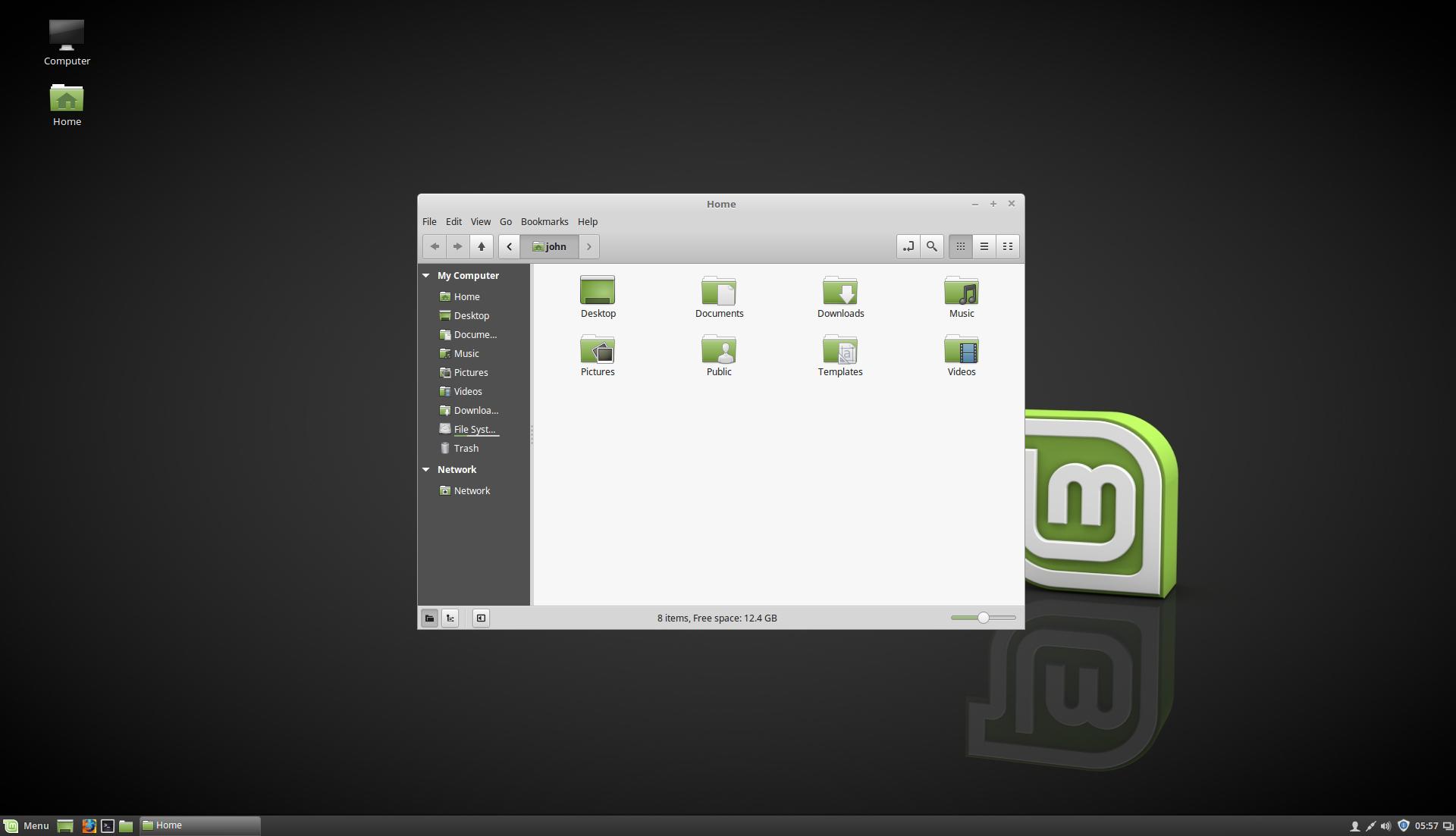
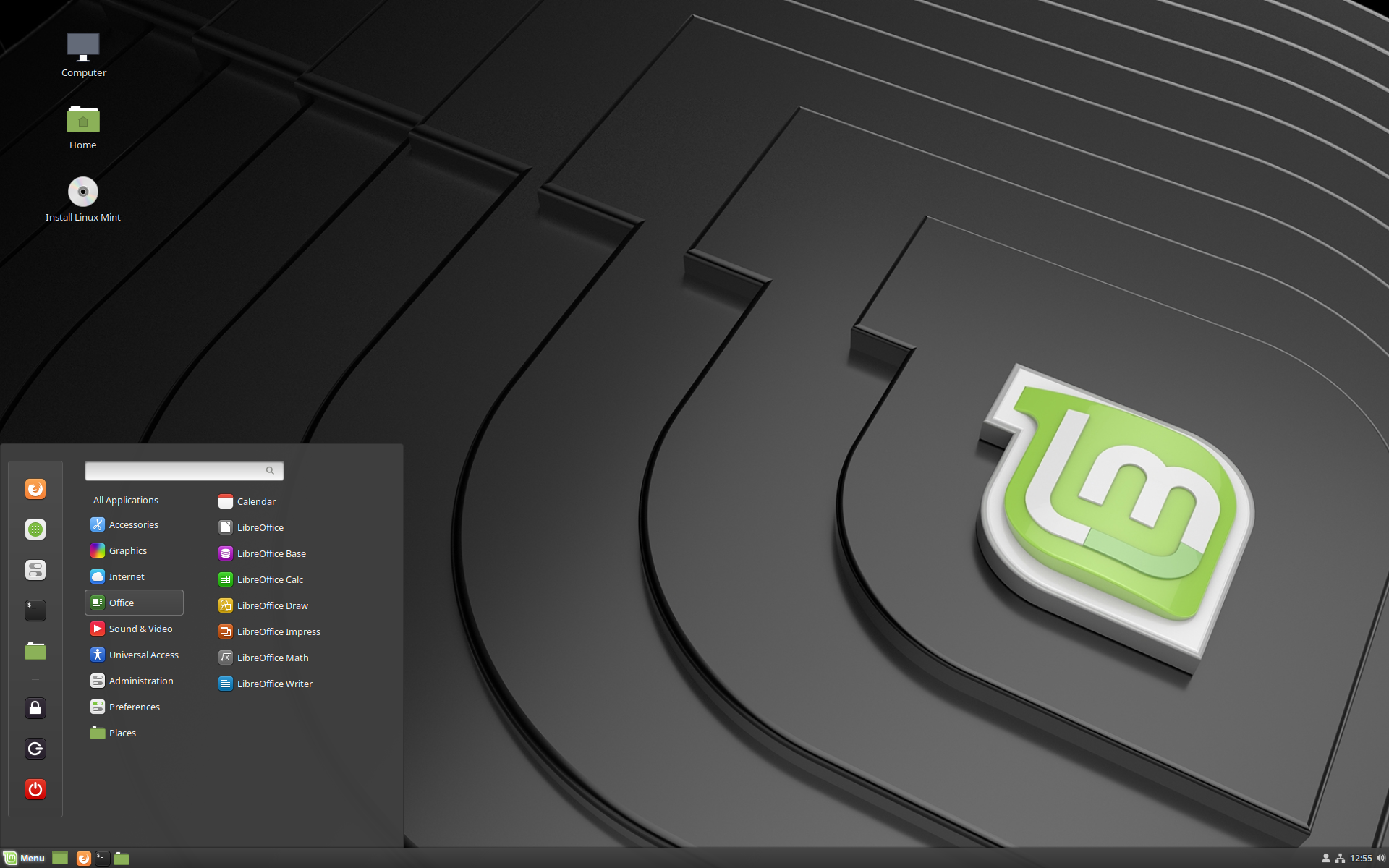

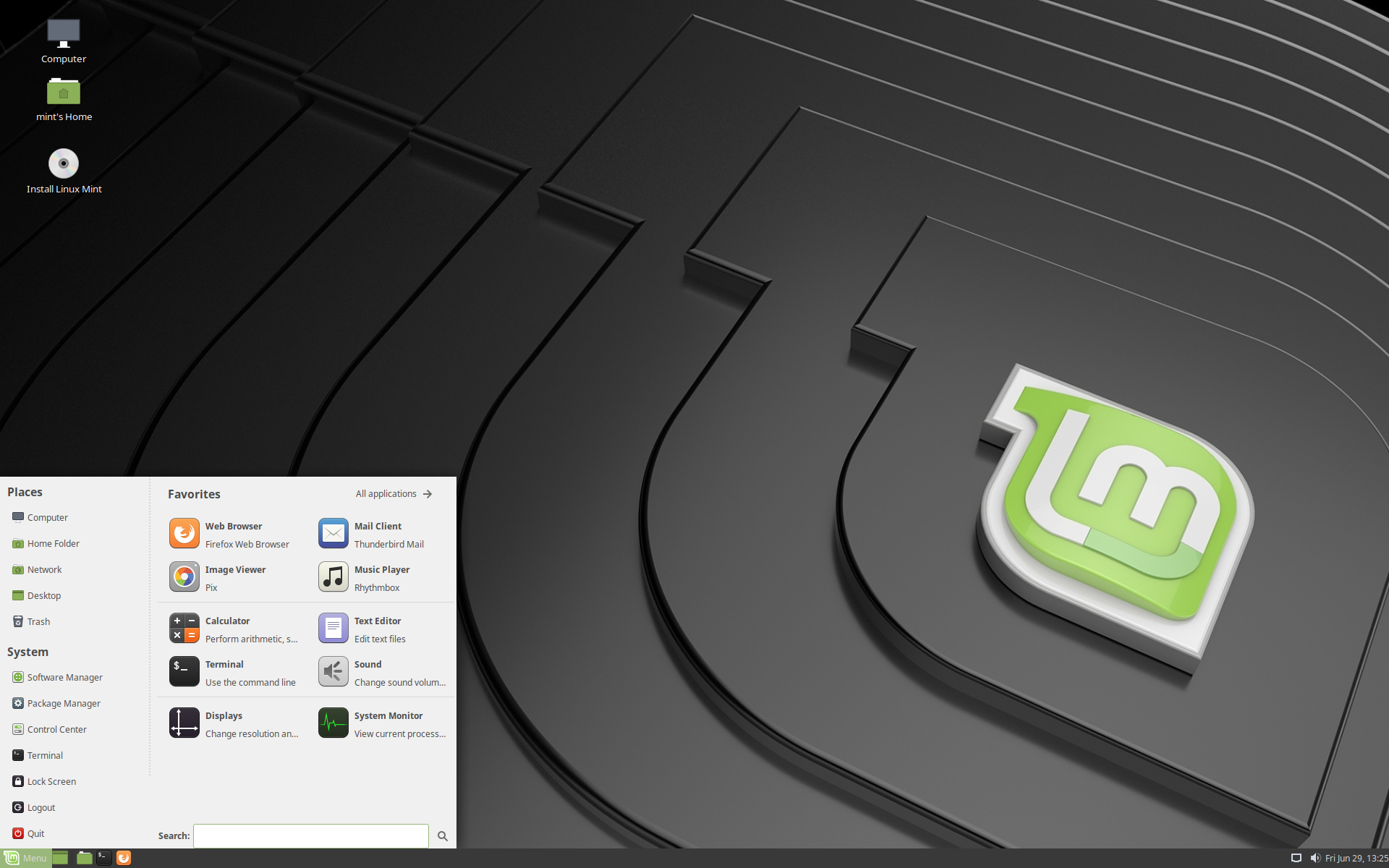
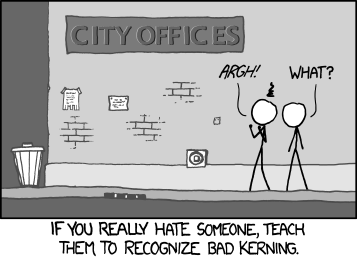
Elementary OS has picked a specific niche, and its arguably the best distribution in it. It has a really well designed and consistent UI experience, and you can't break it. I think most of you just don't realize how difficult linux is for people who barely understand how to use a Mac or Windows machine.
Furthermore, linux is a world where mainstream distributions still release with horrible UI experiences with numerous typography mistakes, icons of different sizes and grid alignment imbalances everywhere.
Like check out this Mint (grey theme) screenshot: https://upload.wikimedia.org/wikipedia/commons/thumb/4/43/Li... and compare it with elementary OS here https://news-cdn.softpedia.com/images/news2/elementary-os-0-...
Mint is great, but seriously. Look at that logo render. Even worse, look at the start bar. Every single text and logo has a different height. I mean how do you even do something like that unintentionally?
I am using XFCE right now, and it's great because its much faster than KDE or Gnome on this old laptop. But it sure isn't a pretty UI. I know a MSc. designer and she claims using my laptop makes her physically sick and dizzy. I don't care as much, but I can see the point. Everything is misaligned, in the start menu, the task bar, the apps. In the window bar the buttons and the minimize arrow aren't the same size. I mean seriously, whoever did this just did not care about Ui.
I don't think ElementaryOS is for everyone. If you have any interest in non-standard repos, recent kernels or doing stuff in commandline, you are just better off elsewhere. I understand their choices, but I don't use it because of how they do the app store, among other things.
But if you just want a computer that runs, looks good and doesn't break if you do X, then I think ElementaryOS is the #1 choice in the Linux world, and we should be thankful that it exists.